Ransomware-Resilient Backup on Azure: Vault to Clean Room
How to build ransomware-resilient backup on Azure: locked immutable vaults, multi-user authorisation, always-on soft delete and a clean-room restore.
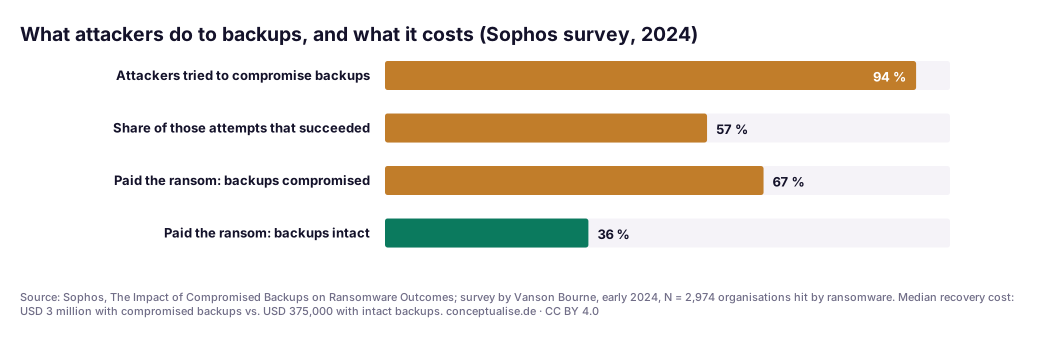
Ransomware crews no longer stop at your servers. In a Sophos survey of 2,974 organisations hit by ransomware, 94% said the attackers tried to compromise their backups. More than half of those attempts succeeded. Victims whose backups were compromised were almost twice as likely to pay (67% against 36%), and their median recovery cost was eight times higher. A backup that the attacker can reach is not a recovery plan. It is a second target.
This guide is for the people who sign off the answer when the cyber insurer asks "are your backups immutable and isolated?", or the board asks how long recovery would take: CISOs, CTOs, cloud architects and heads of IT operations on Azure. We walk the path from production to a locked vault and into an isolated clean room, with each Azure Backup control checked against Microsoft's documentation as of 15 November 2026, then put indicative recovery times and costs on five patterns.
TL;DR / Key takeaways
- Lock it or it doesn't count. Azure Backup immutability has three states. Only enabled and locked is irreversible and backed by WORM storage. An unlocked immutable vault can be switched off by whoever holds the admin rights the attacker just stole.
- Separate the people, not just the data. Multi-user authorisation (MUA) with a Resource Guard in a different tenant means that the identity running production cannot approve the destruction of its own backups.
- Snapshots are not backups for this threat. Instant-restore snapshots live in your subscription, and Microsoft documents that they can be deleted before the soft-delete period ends. Plan your clean recovery from vaulted recovery points.
- The real RTO is set by the clean room, not the vault. Restoring bytes is fast. Finding a clean restore point, rebuilding identity and proving the environment is safe is what takes days, unless you built and drilled it in advance.
- Regulators already expect this. DORA Article 12 requires restoration onto segregated systems and Article 11(6) yearly tests with cyber-attack scenarios; NIS2 and BSI IT-Grundschutz CON.3 point the same way.

Download: Editable draw.io file · Open in diagrams.net · Chart data (CSV)
Why this matters now
Two things changed. Attackers learned to go for the backups first, and since late 2024 Azure Backup has shipped most of the controls to stop them.
The attack pattern. Microsoft's ransomware guidance says these attacks target "your data, your backups, and also key documentation required for you to recover". It also describes ransomware that slowly encrypts data while keeping the key on the system, so the data stays usable, nobody notices, and the recent backups are of encrypted data. Compromised backups turn a recovery problem into a ransom negotiation.
The platform. Azure Backup's release notes since 2024 read like a ransomware roadmap:
| When | Change | Status (15 Nov 2026) |
|---|---|---|
| Jul 2024 / Mar 2025 | Vaulted backup for Azure Blobs / Azure Files | GA |
| Nov 2024 | WORM storage for locked immutable Recovery Services vaults | GA (regional rollout continues) |
| Nov 2024 → 2026 | Secure-by-default soft delete (cannot be disabled) | Listed GA for Recovery Services vaults in all public regions and national clouds; Backup vaults mostly preview |
| Nov 2025 | Threat detection for Azure VM backups with Defender for Cloud | Preview |
| May 2026 | Bulk restore of up to 100 VMs in one operation | Preview |
| Sep 2026 | Time-based immutability for Recovery Services vaults | Available |
| Oct 2026 | Cross-tenant restore | Preview |
Insurers have noticed too; our cyber insurance architecture guide covers the questionnaire.
The architecture, zone by zone
The figure has four trust zones and one design rule: the identity that runs production must never be able to destroy the backups or approve its own recovery. The numbers match the callouts.
① Production and the snapshot trap
Azure VM backup has two tiers. Snapshots (instant restore) stay in your own subscription for fast restores; the vault tier copies data into the vault. The Enhanced policy backs up VMs as often as every four hours, and SQL Server and SAP databases can ship log backups every 15 minutes.
The trap is treating snapshots as your ransomware answer. Microsoft's documentation says that disk and VM backup snapshots, unlike vaulted backups, "can be directly accessed and deleted before the soft-delete period expires". An Owner on the production subscription can remove them. Operational-only backups are just as exposed: immutability does not apply to operational backups of blobs, files and disks. Use vaulted backup, GA for Blobs since July 2024 and for Azure Files since March 2025.
② The vault: locked immutability and always-on soft delete
Vaulted data sits in a Microsoft-managed subscription and tenant. Microsoft calls the target outcome a logically air-gapped vault, and says plainly that this "isn't a physical or offline air gap, and it doesn't replace controls over identities that can manage the vault".
Immutability has three states: Disabled, Enabled (blocks destructive operations but can be switched off) and Enabled and locked (irreversible, with WORM storage; in regions without WORM support yet, the service enforces the lock and migrates later). It blocks deleting backup data before expiry and any policy change that shortens retention. Since September 2026, Recovery Services vaults can lock immutability for a fixed duration, say 30 days, instead of the whole retention. That removes the objection we hear most: "if we lock it, we pay for ten years of yearly backups." Choose the duration carefully: it applies to every recovery point, and the lock is permanent.
Soft delete keeps deleted backup data for 14 to 180 days; the first 14 days cost nothing extra. Secure-by-default soft delete is listed as GA for Recovery Services vaults in all public regions and cannot be disabled there. For Backup vaults it is GA in only three regions, so check yours.
Encryption uses Microsoft-managed keys by default. With customer-managed keys, the key vault joins your recovery path: keep it out of production admins' reach and turn on purge protection.
③ Multi-user authorisation with an out-of-tenant Resource Guard
Immutability stops deletion, not the weakening of everything around it. MUA adds a second authoriser: critical vault operations need permissions on a separate Resource Guard owned by a security admin. Disabling soft delete and removing MUA are always protected. Disabling immutability, deleting protection, reducing retention, changing encryption and stopping backups are protected by default.
Where the Resource Guard lives decides its value. Microsoft rates the same subscription as "least isolation" and a different tenant as "maximum isolation". In a ransomware scenario, assume tenant-level compromise: a Global Administrator can elevate themselves to manage every subscription in the tenant. So put the Resource Guard in a separate security tenant, and grant the time-bound Backup MUA Operator role through Entra PIM, never Contributor, which could delete the guard. Our PIM guide covers the just-in-time pattern.
Azure's own scoring rewards this. The Excellent security level requires irreversible protection (locked immutability or always-on soft delete) and MUA. That is the line an insurer's assessor will look at.
④ Geo copy, cross-region and cross-tenant restore
Geo-redundant storage with Cross Region Restore lets you restore in the paired region whenever you choose, without waiting for an outage declaration. For ransomware, the escape routes matter more. Cross-subscription restore sends vault-tier VM recovery points to another subscription in the same tenant. Cross-tenant restore (preview since October 2026) restores vaulted points into a different Entra tenant through a vault mapping. Know its limits:
- The mapping must exist before the incident; creating it needs the source tenant access you may lose.
- Alternate-location restore and vaulted points only; no ADE-encrypted or confidential VMs, no archive tier.
- Backup vault workloads (Blobs, PostgreSQL, Cosmos DB, AKS) only in a few regions: West and North Europe yes, Germany West Central no.
⑤ The isolated recovery environment
An isolated recovery environment (IRE) is where you restore when you no longer trust production: a separate tenant or subscription, built from code in peacetime and kept dormant. No peering to production, its own logging, break-glass identities that never existed in the production directory. When financial entities restore on their own systems, DORA Article 12(3) requires ICT systems "physically and logically segregated from the source ICT system". Dormant is the point: you pay for the IaC, the identity design and the drills, not for idle compute.
⑥ The clean room: pick a clean point, validate, rebuild identity first
Inside the IRE, the clean room is a process as much as a place:
- Pick the restore point from the incident timeline, not from the clock. Microsoft's guidance says to "carefully review the incident timeline to understand the right point-in-time to restore" and to scan the backup before restoring. With slow, quiet encryption, the newest backup is often the worst choice.
- Use Azure's signals, sceptically. Threat detection for VM backups (preview) uses Defender for Servers signals to flag suspicious restore points. It does not scan backup data itself. Treat it as a first filter, not a clean bill of health.
- Rebuild identity first. Microsoft's priority list starts with identity, then life-safety, financial, product and minimum security systems. Without a trustworthy directory, every restored workload inherits the attacker's foothold.
- Restore in batches. Bulk restore (preview) handles up to 100 VMs from a Recovery Services vault in one operation.
⑦ Return to service and re-protect
This is where teams cut corners under pressure. Rotate every secret, key and certificate the restored systems touch. Re-protect workloads into a hardened vault before opening them to users. Keep the evidence pack (timeline, restore-point choice, validation results); your regulator, insurer and incident response process will ask for it.
What the numbers say
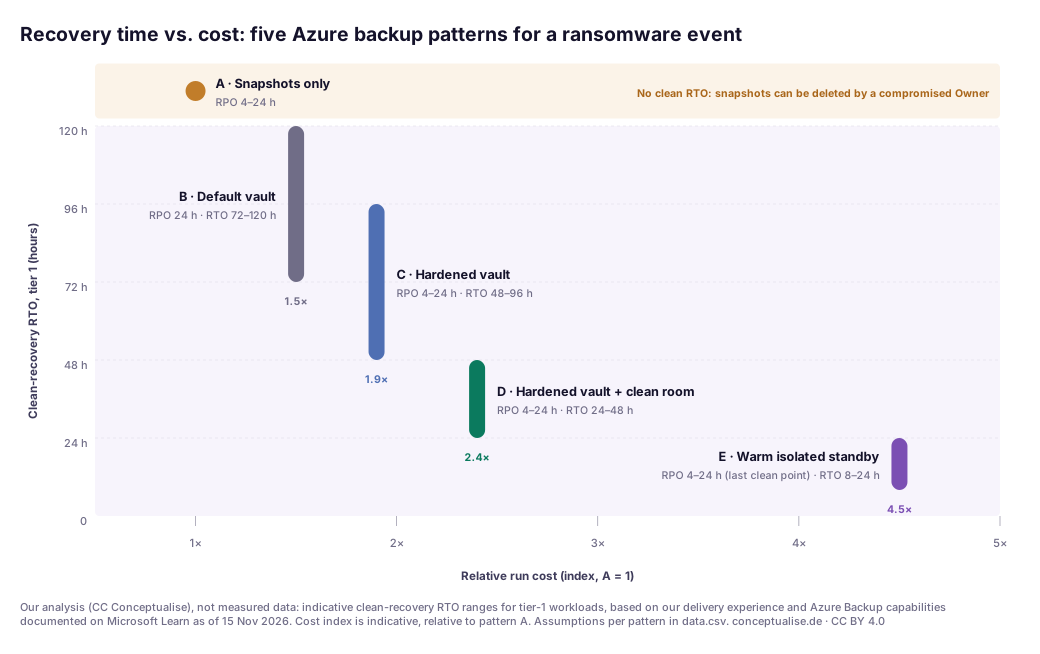
This chart is our analysis, not measured data. It shows indicative clean-recovery RTO ranges for tier-1 workloads, based on our delivery experience and the Azure capabilities above. The cost index is indicative and relative to pattern A. The assumptions behind each pattern are in the CSV.
| Pattern | What it is | RPO | Indicative clean RTO (tier 1) | Cost index |
|---|---|---|---|---|
| A · Snapshots only | Instant-restore snapshots in the production subscription | 4–24 h | Not assured | 1.0× |
| B · Default vault | Daily vaulted backup, 14-day soft delete, no MUA, no prepared IRE | 24 h | 72–120 h | 1.5× |
| C · Hardened vault | Enhanced policy, locked immutability, always-on soft delete ≥ 30 days, cross-tenant MUA, GRS + CRR | 4–24 h | 48–96 h | 1.9× |
| D · Hardened vault + clean room | C plus a dormant IaC-built IRE, restore paths set up in peacetime, yearly timed drill | 4–24 h | 24–48 h | 2.4× |
| E · Warm isolated standby | D with tier-0 identity and tier-1 platform running in the IRE | 4–24 h (last clean point) | 8–24 h | 4.5× |
Three readings:
- The biggest RTO gain is not in the vault. B to C buys certainty that a clean copy exists. C to D buys time, because the slow part is building somewhere safe to restore into mid-incident.
- RPO barely moves. Ransomware RPO is set by the last clean point. Replication shows minutes for a regional outage, but it faithfully replicates the encryption, so pattern E still starts from a vault point.
- Pattern E is a board decision. We recommend D for most tier-1 estates and reserve E for systems where a day of downtime costs more than the standby.
In a recent engagement…
During a backup resilience review this year for a European mid-market company, the dashboard looked reassuring. Every production VM was protected, jobs were green, and immutability showed as Enabled. Walking the ransomware path changed the picture. Immutability had never been locked. The backup administrators held Contributor on the vault and were members of the group that owned the Resource Guard, which sat in the same subscription. Blob storage for the document platform had operational backup only. And the restore runbook assumed that the production Entra tenant and the hub network would still be there.
None of this was negligent; each choice had a reason, usually "we'll tighten it after go-live". The fixes took weeks. We moved the Resource Guard into a separate security tenant, set time-based immutability to 30 days and locked it after two weeks of observation, switched blobs to vaulted backup and built a dormant recovery subscription from the existing landing-zone code. The first timed drill took far longer than the documented RTO. That was the review's most useful finding: drills belong in the plan, not the appendix.
The checklist
Callout numbers refer to the figure.
| # | Control | Azure implementation | Callout |
|---|---|---|---|
| 1 | Vaulted, not just snapshots | Vault-tier policies for VMs; vaulted backup for Blobs and Azure Files | ①② |
| 2 | Irreversible deletion protection | Immutability enabled and locked (time-based where it fits), always-on soft delete | ② |
| 3 | Retention that outlasts dwell time | Soft-delete retention ≥ 30 days for tier 1; immutability duration matched | ② |
| 4 | Second authoriser | MUA with Resource Guard in a separate tenant; JIT via PIM | ③ |
| 5 | Excellent security level | Locked immutability or always-on soft delete, plus MUA | ②③ |
| 6 | Key separation | CMK vault outside production admin scope, purge protection on | ② |
| 7 | Geo and tenant escape routes | GRS + Cross Region Restore; cross-subscription restore; cross-tenant mapping (preview) | ④ |
| 8 | Isolated recovery environment | Separate tenant or subscription from IaC, no peering, break-glass identities | ⑤ |
| 9 | Clean restore point selection | Incident timeline + Defender threat-detection tags + scan in the clean room | ⑥ |
| 10 | Recovery order | Identity → life-safety → financial → product → security | ⑥ |
| 11 | Timed drills | At least yearly, with a cyber-attack scenario | ⑤–⑦ |
| 12 | Offline copies of the runbook | Printed or out-of-band copies of the restore procedures and contacts | ⑦ |
Governance for European enterprises
Several regimes ask for this architecture without naming it.
DORA (Regulation (EU) 2022/2554) is the most concrete. Article 12 requires documented backup and restoration procedures, periodic testing and, when restoring on own systems, ICT systems physically and logically segregated from the source. Article 12(6) ties RTO and RPO to the criticality of each function. Article 11(6) requires at least yearly tests of response and recovery plans, including cyber-attack scenarios for all but microenterprises. A clean-room drill is that test. See our DORA implementation guide for Azure.
NIS2 Article 21(2)(c) lists "business continuity, such as backup management and disaster recovery, and crisis management" among the minimum risk-management measures. In Germany that list applies through § 30 BSIG under the NIS2 implementation act, applicable since 6 December 2025. See our NIS2 risk-management measures on Azure.
BSI IT-Grundschutz CON.3 requires that backups cannot be overwritten deliberately or accidentally (CON.3.A14) and that restores are tested regularly for correctness and reasonable time (CON.3.A15). GDPR Article 32(1)(c) asks for timely restoration of personal data: a restore objective, not a backup objective.
A pragmatic adoption path
- Week 1: measure. Pull the security level of every protected item from Resiliency (the successor experience to Azure Business Continuity Center). List snapshot-only and operational-only workloads, unlocked vaults, and who can approve critical operations.
- Weeks 2–3: separate the authority. Resource Guard in a separate security tenant, MUA on every production vault, Backup MUA Operator behind PIM. Cheap and reversible, so do it first.
- Weeks 3–4: make deletion impossible. Raise soft-delete retention for tier 1, move blobs and file shares to vaulted backup, enable immutability, observe for two weeks, then lock it with a duration agreed with finance.
- Month 2: build the escape route. A dormant recovery tenant or subscription from your landing-zone code, cross-subscription restore and, where supported, a cross-tenant vault mapping. Print the runbook.
- Month 3: drill. Timed restore of one tier-1 application into the clean room, identity first, with production assumed hostile. Record the real RTO, fix what broke, repeat at least yearly.
The verdict
Azure Backup now has the parts: locked WORM immutability, soft delete you cannot turn off, a second authoriser in another tenant, and the first cross-tenant restore paths. Apart from soft delete, none of them is on by default, and soft delete alone is not enough.
Our view is simple. Get every tier-1 vault to Microsoft's Excellent level this quarter: lock it, and put MUA in a separate tenant. Then spend the next quarter on the part nobody demos, the clean room you will restore into. A locked vault ensures you have a clean copy. Only a drilled clean room tells you how long it takes to use it, and that number is what your board and your insurer are really asking for.
If you want a second pair of senior eyes on your backup and recovery design, from vault hardening and MUA in a separate tenant to the first clean-room drill, our Zero Trust and cybersecurity practice does this as a short, fixed-scope review. Where the recovery environment needs to become part of your landing zone, our cloud architecture team builds it with you.
FAQ
Is Azure Backup immutable by default?
No. Soft delete is on by default and, for Recovery Services vaults, can no longer be disabled; it keeps deleted backups for 14 to 180 days. Immutability is a separate setting you must enable, and only the "enabled and locked" state is irreversible and backed by WORM storage.
What is the difference between immutability and soft delete in Azure Backup?
Soft delete lets you undo a deletion for 14 to 180 days. Immutability blocks the deletion, or any shortening of retention, before recovery points expire. Microsoft's "Excellent" security level needs one of them in its irreversible form plus multi-user authorisation.
Does multi-user authorisation stop an attacker who has Global Administrator rights?
Only if the Resource Guard is outside the attacker's tenant. A Global Administrator can elevate themselves to manage every subscription in their tenant, so a same-tenant Resource Guard is a speed bump. Microsoft rates a Resource Guard in a different tenant as maximum isolation; we recommend it for production vaults.
How long should backup immutability and soft delete retention be?
Long enough to reach back before the attacker arrived. Soft delete allows 14 to 180 days, the first 14 free. Since September 2026, Recovery Services vaults can lock immutability for a fixed duration instead of the full retention. For tier-1 systems we rarely go below 30 days.
What is a clean room or isolated recovery environment?
A separate tenant or subscription with no network or identity trust to production, built from code before the incident. You restore into it, validate restore points, rebuild identity first and only then promote workloads back to service.
Which EU rules require ransomware-resilient backups?
DORA Article 12 requires restore testing and restoration onto segregated systems, and Article 11(6) yearly tests with cyber-attack scenarios. NIS2 Article 21(2)(c), in Germany § 30 BSIG, lists backup management and disaster recovery. GDPR Article 32 and BSI IT-Grundschutz CON.3 add timely restoration and protected, tested backups.
Sources
Checked on 15 November 2026. Azure features marked preview can change; check the linked pages before you rely on them.
Tier A: primary and regulatory
- Microsoft Learn: Immutable vault for Azure Backup (updated 26 Oct 2026)
- Microsoft Learn: Secure by default with soft delete for Azure Backup
- Microsoft Learn: Multi-user authorisation using Resource Guard
- Microsoft Learn: Overview of security and cyber recovery in Azure Backup (security levels, logically air-gapped vault)
- Microsoft Learn: Cross-tenant restore for Azure Backup (preview)
- Microsoft Learn: Threat detection for Azure VM backups with Defender for Cloud (preview)
- Microsoft Learn: What's new in Azure Backup (updated 9 Nov 2026)
- Microsoft Learn: Azure backup and restore plan to protect against ransomware
- Microsoft Learn: What is Resiliency in Azure?
- Microsoft Learn: Elevate access to manage all Azure subscriptions and management groups
- Regulation (EU) 2022/2554 (DORA), EUR-Lex: Art. 11(6), 12
- Directive (EU) 2022/2555 (NIS2), Art. 21(2)(c); Regulation (EU) 2016/679 (GDPR), Art. 32(1)(c)
- BSI IT-Grundschutz-Kompendium, CON.3 Datensicherungskonzept (Edition 2023)
Tier B: research and analysis
- Sophos: The Impact of Compromised Backups on Ransomware Outcomes (survey by Vanson Bourne, early 2024, N = 2,974)
- Sophos: The State of Ransomware 2025 (N = 3,400, 17 countries)
Tier C: vendor and directional
- Recovery time and cost index in chart 1: CC Conceptualise analysis, indicative, not measured. Assumptions in data.csv.
Topics