DSPM in the AI Era: Find Sensitive Data Before Copilot Does
What DSPM must do once copilots and agents read your data: the posture loop, Purview DSPM in 2026, which stores leak most, and a five-step rollout plan.
On 30 October 2026, Microsoft updated message center post MC1481315: the classic versions of Purview Data Security Posture Management and DSPM for AI retire in March 2027. Their replacement is one product that treats "where is our sensitive data?" and "what are copilots and agents doing with it?" as the same question. DSPM used to be a cloud-storage inventory. Now it is the precondition for switching AI on.
This article is for the people who sign off that switch: CISOs, data protection officers, Microsoft 365 and cloud architects. We describe the posture loop product-neutrally, show where Microsoft Purview DSPM fits as of November 2026, score which data stores carry the most AI exposure, and give a five-step path that holds up under GDPR and works-council scrutiny.
TL;DR / Key takeaways
- AI changes discovery, not permissions. Copilot only surfaces what the user can already view. The risk is that a prompt now finds what search never did.
- DSPM is a loop, not a scan. Discover, classify, map exposure, remediate, then watch the AI edge. A one-off readiness assessment goes stale within weeks.
- Purview DSPM is now one product. DSPM and DSPM for AI merged (GA May 2026). It is strong in Microsoft 365 and thinner elsewhere.
- The riskiest stores are the new ones. On our scoring, browser AI uploads, RAG indexes and SaaS apps rival SharePoint, and native tooling sees them least.
- Fix access, don't just hide it. Restricted Content Discovery and label-based DLP buy time. Removing links and right-sizing groups closes the gap.

Download: Editable draw.io file · Open in diagrams.net · Chart data (CSV)
Why this matters now
The exposure was always there; AI made it findable. Varonis' 2025 State of Data Security Report, covering 1,000 IT environments, found sensitive data that AI could easily surface in 99% of organisations, and labelled files in only 1 in 10 companies. Microsoft is blunt about the mechanism: Copilot "only surfaces organizational data to which individual users have at least view permissions". Permissions that were wrong for years now matter.
Shadow AI became a breach category. IBM's Cost of a Data Breach Report 2025 (Ponemon, 600 breached organisations) found that one in five organisations reported a breach due to shadow AI. Among those with breaches of AI models or applications, 97% lacked proper AI access controls.
The tooling consolidated. Microsoft announced the new Purview DSPM in November 2025, and message center post MC1191257 lists general availability for May 2026. It folds DSPM for AI into one experience with objectives, data risk assessments and AI observability. The buying question is no longer whether to have DSPM, but which tool owns which store.
The posture loop, step by step
The numbers match the callouts in the figure. We note where Microsoft Purview, which most of our DACH clients already license, covers a step.
① Discover: inventory every store, including the ones AI creates
Start with stores, not content. The usual list is Microsoft 365, cloud object storage, databases, SaaS apps and file shares. AI adds three stores most inventories miss:
- RAG indexes and vector stores: copies of source documents, often built with a service identity that can read more than any single user.
- Prompt and response logs: Microsoft stores Copilot prompts, responses and citations as activity history; other AI apps keep their own.
- Browser AI uploads: data pasted into public chatbots leaves the tenant. Purview sees it only on onboarded devices (with the Edge integration or the Purview browser extension), or via a SASE/SSE integration.
Purview DSPM covers Microsoft 365 natively. Google Cloud, Snowflake and Databricks arrive through partner integrations (Varonis, Cyera, BigID, OneTrust) on Microsoft Sentinel data lake, a setup still marked preview. For cloud storage and databases, CNAPP-style DSPM such as Defender for Cloud or Amazon Macie does discovery; see our piece on cloud attack paths.
② Classify: sample first, then deepen where it matters
Every serious tool samples. Defender for Cloud samples up to 20 MB per file and 300 to 1,024 rows per selected table; Macie samples S3 objects automatically. That is the right default, but record which stores you have only sampled.
In Microsoft 365, sensitive information types, classifiers and sensitivity labels do the work. The honest blocker is labelling coverage: if one company in ten labels files, label-based controls protect little. Start auto-labelling for the obvious types (IBAN, tax ID, health and HR data) on the sites the risk assessment flags.
③ Map exposure: who and what can reach it
This step separates DSPM from a data catalogue. For each sensitive item, ask how broadly it can be reached: "anyone" and organisation-wide links, broad groups and stale accounts (Varonis found stale but enabled accounts in 88% of organisations), anonymous cloud storage (66% of companies), and which copilots, agents and indexes can retrieve it under whose identity.
Purview's data risk assessments make this concrete. A default assessment runs weekly over the top 100 SharePoint sites by usage, with first results after four days. Custom assessments target chosen users and sites. Item-level scanning needs a registered Entra app, currently covers up to 10 SharePoint sites and excludes OneDrive. A Fabric tab covers the top 100 workspaces. The default assessment shows where to look, not everything there is.
④ Remediate: close access, then contain discovery
Start with changes that remove exposure, then contain. Purview's options are:
- Remove sharing links on overshared items and notify site owners.
- Apply or correct sensitivity labels, or create an auto-labelling policy.
- DLP for the Microsoft 365 Copilot location, which stops Copilot and agents summarising items with selected labels.
- Retention policies for content not accessed for three years.
- Restricted Content Discovery for whole sites under review.
Be clear about the last one. Microsoft calls it "a temporary governance control": it hides a site from organisation-wide search and Copilot, but does not change permissions or cover OneDrive, and on sites above 500,000 items it can take more than a week to apply. Our Copilot oversharing playbook sequences these controls.
⑤ Watch the AI edge: prompts, responses and agents
The loop closes with what AI actually touched. AI observability lists apps and agents active in the last 30 days, including Copilot Studio, Foundry and Agent 365 agents, and flags sensitive interactions. Activity explorer shows prompts and responses containing sensitive information. Policies carried over from DSPM for AI detect sensitive data pasted into AI sites and can block elevated-risk users.
Three prerequisites catch teams out: device onboarding plus the browser extension for third-party AI sites, a SASE/SSE integration for network detection, and pay-as-you-go billing for AI apps other than Microsoft 365 Copilot. Agents add an identity problem too. See our guides on Copilot Studio architecture and shadow MCP discovery.
What the numbers say
We scored nine store types on four factors, each 0–3: sensitive data density, breadth of default access, AI reachability and the discovery gap with native tooling. This is our analysis, not a measurement, scored from vendor documentation and engagement experience. The rubric and reasoning per row are in the CSV.
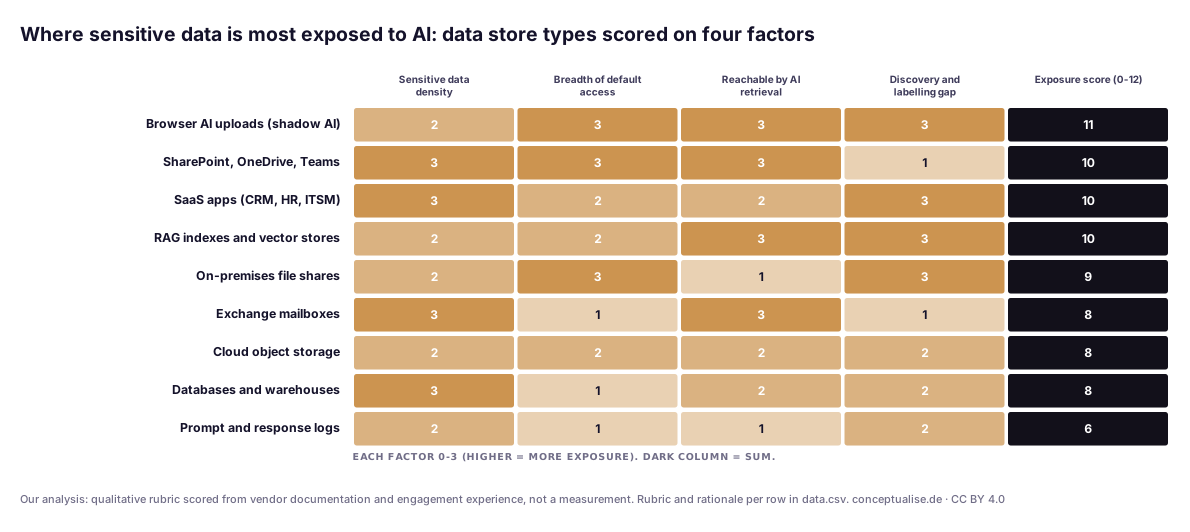
SharePoint, OneDrive and Teams score high on three factors but low on the gap, because Purview sees them well. That is why readiness programmes start, and stop, there. Browser AI uploads, RAG indexes and SaaS apps score as high or higher, and their exposure sits in the gap column. Prompt logs score low today, but they are the one store that grows with every AI interaction.
The published figures point the same way. They come from different samples and are not comparable with each other:
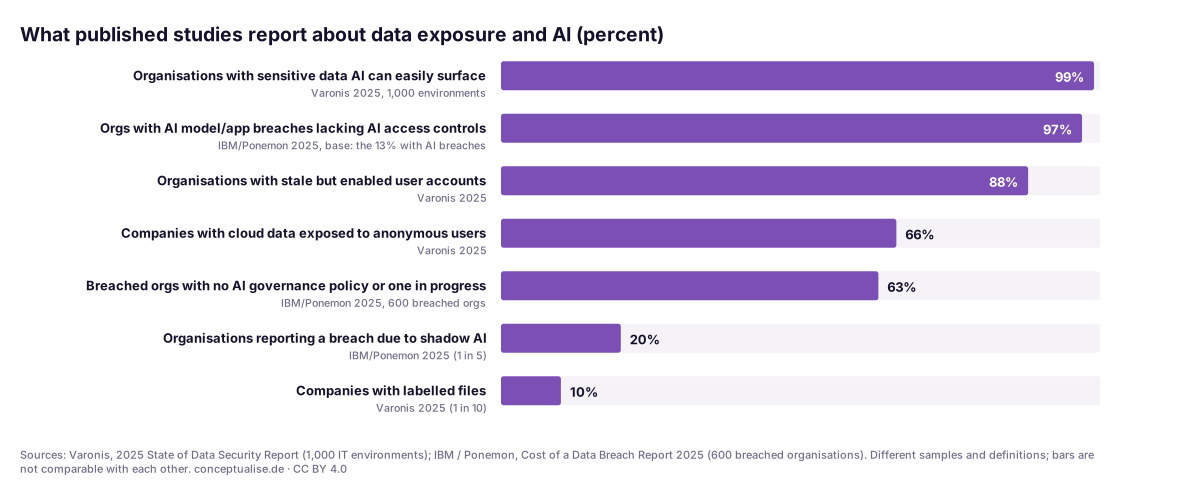
Exposure is near-universal, labelling is rare and AI governance lags both. The problem is access that was never cleaned up, not clever AI.
In a recent engagement…
A DACH industrial group asked us for a Copilot go/no-go ahead of a pilot. The first data risk assessment found what we expected: busy project sites with organisation-wide links on contract folders, and an HR site where a former team's group still had read access. Site owners fixed these quickly once they were named.
The more useful finding was outside Microsoft 365. A business unit had built its own RAG assistant on a vector index fed from a file-share export, running under a service account that could read the whole share, payroll exports included. No Purview report showed it, because it was out of scope. The answer became "go, after a store inventory", and the inventory turned out to be the long pole.
Choosing your DSPM approach
Most enterprises need more than one tool. Decide which owns which store.
| If most sensitive data is in… | Lead with | Watch out for |
|---|---|---|
| Microsoft 365 | Purview DSPM: risk assessments, labels, DLP for Copilot | Item-level scans capped at 10 sites; no OneDrive item scans |
| Azure, AWS, GCP storage and databases | Your cloud security platform's DSPM (e.g. Defender for Cloud, Macie) | Sampling-based; attack-path context rather than labels |
| Snowflake, Databricks, Google Cloud | Purview partner integrations | Setup in preview; Sentinel data lake costs |
| SaaS apps and on-premises shares | A specialist DSPM with those connectors | Another console; agree who owns remediation |
| Home-grown RAG and agents | Your own inventory plus identity review | Few tools inspect vector stores |
Pre-Copilot checklist
- Store inventory includes RAG indexes, vector stores and prompt logs.
- Top 20 overshared sites from the default assessment have named owners.
- "Anyone" and organisation-wide links on sensitive sites removed.
- Stale accounts disabled; broad groups removed from sensitive sites.
- Auto-labelling live for your top five sensitive information types.
- DLP for the Copilot location blocks your highest label.
- Restricted Content Discovery only on sites under review, with an end date.
- Agent identities reviewed: no agent reads more than its users could.
Governance for European enterprises
GDPR. Article 25(2) requires that personal data is not, by default, made accessible to an indefinite number of people. An organisation-wide link on an HR folder is close to the textbook case. Article 32 requires security appropriate to the risk, and Article 5(1)(c) and (e), data minimisation and storage limitation, make stale copies a compliance issue. Check whether your DPIA under Article 35 covers Copilot and agents.
NIS2. Article 21(2)(i) lists access control policies and asset management among the required measures. A store inventory with access mapping is the evidence auditors ask for; our NIS2 measures on Azure maps the controls.
DORA. Article 8 requires financial entities to identify, classify and document information assets. DSPM output feeds that register.
Works councils. In Germany, section 87(1) no. 6 BetrVG gives the works council co-determination over systems suited to monitoring employee behaviour. Prompt capture and insider risk policies qualify. Agree them before you switch AI observability on.
A pragmatic adoption path
- Weeks 1–2: inventory stores. List every store with sensitive data, AI-created ones included, and give each an owner and a tool.
- Weeks 2–4: run the default assessments. Turn on Purview DSPM and your cloud DSPM's discovery. Rank findings; don't fix yet.
- Weeks 4–8: remediate the top of the list. Remove links, right-size groups, disable stale accounts, start auto-labelling.
- Weeks 6–10: guard the AI edge. DLP for Copilot, device onboarding and browser extension, agent identity review, works council agreement.
- From week 10: run the loop. A weekly posture review on two metrics: sensitive items reachable organisation-wide, and sensitive AI interactions.
The verdict
DSPM earns its budget in the AI era because it turns "is it safe to switch Copilot on?" into a list of stores, owners and fixes. The tooling is good enough now. What no tool does is own the stores outside its scope or fix permissions nobody wants to touch. Inventory first, fix access before hiding it, and keep the loop running after go-live, because every new agent and index is a new store.
If you want an outside view before your AI rollout, our Zero Trust and cybersecurity practice runs this loop with clients, from store inventory to Purview configuration. Our AI practice covers the agent and RAG side.
FAQ
What is DSPM in plain terms?
Data security posture management is a continuous loop that finds where sensitive data lives, classifies it, works out who and what can reach it, and drives the fixes. In the AI era it must also cover the copies AI creates, such as RAG indexes and prompt logs, and the paths copilots and agents use to retrieve data.
Is Microsoft Purview DSPM for AI still a separate product?
No. Microsoft merged DSPM and DSPM for AI into one Data Security Posture Management experience, generally available since May 2026. The old versions are now called DSPM (classic) and DSPM for AI (classic); message center post MC1481315 says they retire between mid-March and late March 2027.
Does Microsoft 365 Copilot create new data exposure?
It does not change permissions. Microsoft states that Copilot only surfaces organisational data the user can at least view. What changes is discovery: content that was accessible but buried is now one prompt away, so old oversharing becomes visible.
Do we need a third-party DSPM if we already have Purview?
It depends on where your sensitive data lives. Purview DSPM covers Microsoft 365 natively and reaches Fabric and partner-connected sources such as Google Cloud, Snowflake and Databricks through integrations. If much of it sits in AWS, on-premises shares or SaaS apps outside that scope, you will usually need a cloud or specialist DSPM alongside it.
Is Restricted Content Discovery enough to make Copilot safe?
No. Microsoft calls it a temporary governance control. It hides selected SharePoint sites from organisation-wide search and Copilot, but it does not change permissions or cover OneDrive. Use it to buy time while owners fix access.
Which EU rules make DSPM relevant?
Mainly GDPR: Article 25(2) says personal data must not by default be accessible to an indefinite number of people, and Article 32 requires appropriate security. NIS2 Article 21(2)(i) covers access control and asset management, and DORA Article 8 requires classifying information assets. In Germany, monitoring prompts usually needs works council agreement.
Sources
All sources checked on 15 November 2026. Product limits change often; re-check before relying on them.
Tier A: primary, vendor documentation and regulatory
- Microsoft Learn, Learn about Microsoft Purview Data Security Posture Management (current version): https://learn.microsoft.com/en-us/purview/data-security-posture-management-learn-about
- Microsoft Learn, Prevent oversharing with data risk assessments: https://learn.microsoft.com/en-us/purview/data-security-posture-management-oversharing
- Microsoft Learn, Considerations for deploying DSPM for AI (classic): prerequisites and one-click policies: https://learn.microsoft.com/en-us/purview/dspm-for-ai-considerations
- Microsoft Learn, Data, privacy and security for Microsoft Copilot: https://learn.microsoft.com/en-us/copilot/plan/microsoft-365-copilot-privacy
- Microsoft Learn, Restrict discovery of SharePoint sites and content: https://learn.microsoft.com/en-us/sharepoint/restricted-content-discovery
- Microsoft Learn, Data security posture management in Defender for Cloud: https://learn.microsoft.com/en-us/azure/defender-for-cloud/concept-data-security-posture
- Microsoft 365 message center MC1191257, new Purview DSPM experience (mirror): https://mc.merill.net/message/MC1191257
- Microsoft 365 message center MC1481315, retirement of the classic experiences (summary): https://mwpro.co.uk/blog/2026/10/30/mc1481315-microsoft-purview-retires-dspm-classic-and-dspm-for-ai-classic-experiences-and-shifts-to-unified-dspm-experience/
- Regulation (EU) 2016/679 (GDPR), Articles 5, 25, 32, 35: https://eur-lex.europa.eu/eli/reg/2016/679/oj/eng
- Directive (EU) 2022/2555 (NIS2), Article 21: https://eur-lex.europa.eu/eli/dir/2022/2555/oj/eng
- Regulation (EU) 2022/2554 (DORA), Article 8: https://eur-lex.europa.eu/eli/reg/2022/2554/oj/eng
- Betriebsverfassungsgesetz (BetrVG), section 87: https://www.gesetze-im-internet.de/betrvg/__87.html
Tier B: research
- IBM, Cost of a Data Breach Report 2025, press release (Ponemon Institute, 600 organisations, 30 July 2025): https://newsroom.ibm.com/2025-07-30-ibm-report-13-of-organizations-reported-breaches-of-ai-models-or-applications,-97-of-which-reported-lacking-proper-ai-access-controls
Tier C: vendor and directional
- Varonis, 2025 State of Data Security Report (1,000 IT environments; vendor research): https://www.varonis.com/blog/state-of-data-security-report
- Microsoft Security Community blog, "Beyond Visibility: The new Microsoft Purview DSPM experience" (18 November 2025): https://techcommunity.microsoft.com/blog/microsoft-security-blog/beyond-visibility-the-new-microsoft-purview-data-security-posture-management-dsp/4470984
- AWS, Amazon Macie features: https://aws.amazon.com/macie/features/
Topics