Copilot Oversharing: The Permissions Clean-Up Playbook
A phased playbook to fix Microsoft 365 Copilot oversharing: SharePoint Advanced Management, Restricted Content Discovery, Purview DSPM and DLP, Nov 2026.
On 31 January 2027, Microsoft retires Restricted SharePoint Search. Since 31 July 2026 no tenant has been able to switch it on. For many organisations, that 100-site allow-list was the thing that made a Microsoft 365 Copilot rollout feel safe: Copilot and organisation-wide search only looked at sites someone had checked. When it goes, Copilot's reach returns to what it always was by design: everything each user is already allowed to open.
That is the whole oversharing problem in one sentence. Copilot creates no new access. It removes the obscurity that hid the old access. The HR folder shared with "Everyone except external users" in 2019, the board deck behind an organisation-wide link and the M&A site whose group never shrank were all reachable before; now they are one prompt away. This playbook is for the people who have to fix that before, or while, Copilot scales: CISOs, Microsoft 365 platform owners, data protection officers and enterprise architects in Europe. It is checked against Microsoft's documentation as of 15 November 2026.
TL;DR / Key takeaways
- Copilot respects permissions, and that is the problem. It surfaces only what a user can at least view. Oversharing is a permissions debt that Copilot makes searchable, not a Copilot bug.
- Four sources cause almost all of it: broad sites and public groups, organisation-wide and "Anyone" links, broken inheritance, and stale groups with orphaned sites.
- Contain first, then remediate. Restricted Content Discovery and Purview DLP hide content from Copilot in days; only owner reviews, item-level reports and group hygiene actually remove access.
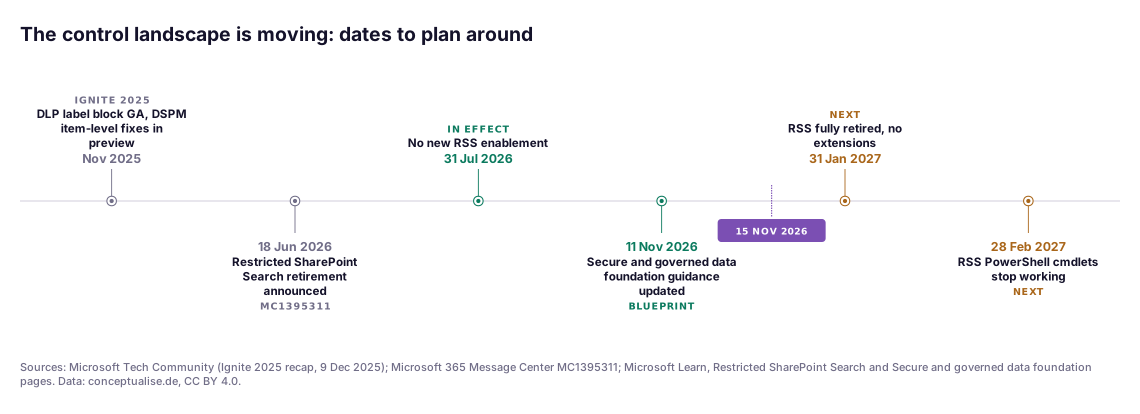
- Restricted SharePoint Search is ending. New enablement is blocked since 31 July 2026 and the feature retires on 31 January 2027. Nothing migrates automatically to Restricted Content Discovery.
- Make it a loop, not a project. Weekly DSPM assessments, monthly activity reports and lifecycle policies stop the debt from coming back.

Download: Editable draw.io file · Open in diagrams.net · Chart data (CSV)
Why this matters now
Three things changed in the last twelve months.
- The crutch is going away. Microsoft announced the retirement of Restricted SharePoint Search (RSS) in Message Center post MC1395311 on 18 June 2026. New enablement was blocked from 31 July 2026. The feature retires fully on 31 January 2027 "with no extensions or exceptions", and its PowerShell cmdlets stop after 28 February 2027. Microsoft names Restricted Content Discovery (RCD) as the replacement, but it will not migrate your RSS allow-list. RSS worked the other way round: it allowed up to 100 sites and hid the rest. RCD hides the sites you flag and shows everything else.
- The tooling matured. At Ignite 2025, Microsoft made Purview DLP blocking of labelled content in Copilot generally available and put item-level remediation in Purview DSPM data risk assessments into preview. SharePoint Advanced Management (SAM) gained the content management assessment, a permission report per user and an agent insights report. On 11 November 2026, Microsoft refreshed its deployment guidance as "Secure and governed data foundation for Microsoft Copilot", organised into three pillars: remediate oversharing, set up guardrails and meet regulations.
- Agents widen the blast radius. Agents and Copilot Cowork act on the same Microsoft Graph content, with the user's permissions. Our indirect prompt injection teardown shows why: EchoLeak (CVE-2025-32711) turned one email into data exfiltration from Microsoft 365 Copilot. What an attacker can steer Copilot towards is bounded by what the user can read, and oversharing sets that bound.
The scale of the debt is not in doubt. Varonis' 2025 State of Data Security Report, based on 1,000 real IT environments and nearly 10 billion files, states that 99% of organisations have sensitive data exposed that AI can easily surface. Microsoft itself, quoting Gartner, warns that by 2027 60% of businesses will fail to realise the anticipated value of their AI use cases because of "incohesive data frameworks". Vendor numbers deserve scepticism; the direction does not.
How Copilot decides what a user sees
The mechanics decide which control works. Microsoft's privacy documentation is explicit: Copilot "only surfaces organizational data to which individual users have at least view permissions", and the Semantic Index "honors the user identity-based access boundary". Copilot runs in the user's security context. If the user can open a file, Copilot can ground an answer in it. If an encrypting sensitivity label withholds the user's usage rights, Copilot cannot use the content either.
That leaves three levers, and every control in this playbook pulls one of them:
- Discovery. Keep content out of organisation-wide search and Copilot discovery without changing access. RCD does this. So did RSS.
- Processing. Let Copilot find the item but forbid it from using the content. Purview DLP for Copilot does this for labelled files and emails.
- Access. Take away the permission itself. Restricted access control (RAC) does it at site level; owner reviews, link clean-up and group hygiene do it at the source.
Only the third lever reduces risk outside Copilot as well. The first two are containment. Both are useful; neither is a fix. Our DSPM for the AI era article covers discovery and classification across data stores; here we stay inside Microsoft 365.
The four sources of oversharing
The numbers match callouts ①–④ in the figure.
① Broad sites and public groups
The biggest exposures are usually not single files but whole sites. A public Microsoft 365 group or Team makes its site readable by every internal user. The special group "Everyone except external users" (EEEU) sits in a site's Visitors or Members group because someone needed a quick fix years ago. Microsoft's own documentation calls unresolved EEEU permissions "a top oversharing risk": the content is visible to every internal user and "surfaces directly in Microsoft Copilot search results".
How to find it: the site permissions report in the data access governance (DAG) reports shows the sites with the broadest access: thousands of users, guests or EEEU. The sites and files shared via special SharePoint groups report goes down to item level.
② Organisation-wide and "Anyone" links
A user wants to share a file with one colleague and picks the default link. If the tenant default is "People in your organization", that file is now reachable by anyone with the link, and Copilot treats links the recipient has redeemed like any other permission. "Anyone" links are worse: no sign-in at all. Links rarely expire unless you make them.
How to find it: the DAG sharing links activity report lists the sites where users created the most "Anyone", "People in your organization" and "Specific people shared externally" links in the last 28 days. Purview DSPM data risk assessments count items shared with anyone, with everyone in the organisation and externally.
③ Broken inheritance
Unique permissions on folders, files and list items are where clean-ups go to die. A site can look tidy at the top while a folder three levels down was shared directly with 40 people for a project that ended in 2022.
How to find it: the oversharing baseline report using permissions, which site owners see in a site access review, lists items by number of permissioned users, groups, links and EEEU/Everyone exposure, most exposed first. Microsoft notes the user count is not de-duplicated, so read it as a ranking, not a headcount.
④ Stale groups and orphaned sites
Access debt compounds. Groups only ever grow. Movers keep access from previous roles. Sites outlive their projects and their owners. An ownerless site is the hardest case: nobody can answer a site access review, so the review fails quietly.
How to find it: site ownership and inactive site policies in SAM, run first in simulation mode, give you the list. Entra ID access reviews and group expiry handle the membership side; our Entra ID hardening guide covers the identity controls around them.
The playbook, phase by phase
The numbers match callouts ⑤–⑧ in the figure. The phases overlap: containment starts while measurement is still running, and remediation runs for weeks behind containment.
⑤ Measure: build the baseline in two weeks
Start with what Microsoft gives you, before buying anything.
- Data access governance reports (SharePoint admin center → Reports → Data access governance). Microsoft's guidance is to run snapshot reports (site permissions) quarterly and activity reports (sharing links, EEEU) monthly. Activity reports cover the last 28 days.
- Content management assessment. The SAM "hub" that bundles content risk checks with recommendations. It became generally available at Ignite 2025.
- Purview DSPM data risk assessments. A default assessment runs weekly on your top 100 SharePoint sites by usage; the first results take four days. Custom assessments can target specific users or sites. Microsoft now documents this under the current Data Security Posture Management experience; the earlier "DSPM for AI" is labelled classic.
- Sites and files shared via special SharePoint groups. Item-level EEEU and Everyone grants as a CSV of up to 1 million rows, covering SharePoint and OneDrive. It needs the new SharePoint Advanced Management Administrator role, which a Global Administrator must assign. Standard SharePoint and Global administrators cannot see file names across sites they do not own.
Two practical points. Assign the SAM Administrator role to a small, named group with PIM: it can view file names and paths across the tenant and remove permissions at scale. And decide early what "overshared" means for you. We use a simple rule: a site is in scope if it is reachable by more than a threshold of users (often all employees) and holds content in a sensitive category from your classification scheme.
⑥ Contain: hide the worst within days
Containment buys time. It should be fast, selective and reversible.
Restricted Content Discovery. Flag the highest-risk sites so their content stops appearing in organisation-wide search (SharePoint home, Office.com, Bing) and Copilot discovery. In the SharePoint admin center the toggle is called Restrict content from Microsoft Copilot; in PowerShell:
# Hide one site from Copilot and org-wide search (permissions unchanged)
Set-SPOSite -Identity https://contoso.sharepoint.com/sites/hr-cases -RestrictContentOrgWideSearch $true

# Tenant-wide report of flagged sites
Start-SPORestrictedContentDiscoverabilityReport
Get-SPORestrictedContentDiscoverabilityReport
Know the limits. RCD does not change permissions. It works on SharePoint sites only, not OneDrive. It does not affect site-scoped search or a document the user already has open. It also removes AI entry points on the site: no Copilot button and no "Create pages with AI". Propagation depends on site size; Microsoft warns that sites with more than 500,000 items can take more than a week. And Microsoft cautions against overuse: every flagged site makes Copilot's answers less complete. Management can now be delegated to site administrators; their justifications land in the Purview audit log.
Restricted access control. Where a site genuinely must be limited to a team, RAC restricts it to members of up to 10 Microsoft 365 or Entra security groups. A user needs both a permission and group membership, so legacy grants and links stop working for everyone outside the groups. Search and Copilot honour it. Two traps: shared and private channel sites are separate site collections and need their own policy, and sharing outside the groups stays possible unless you set AllowSharingOutsideRestrictedAccessControlGroups to $false.
Purview DLP for Copilot. If you have a working sensitivity label taxonomy, a DLP policy on the Microsoft Copilot, Copilot Chat and Copilot Cowork location can stop Copilot from processing files and emails with chosen labels, such as "Highly Confidential". Items can still appear as citations, but their content is not used. Coverage includes emails sent on or after 1 January 2025; calendar invites are not covered. Policy changes take up to four hours. DLP cannot scan files that users upload directly into a prompt.
⑦ Remediate: remove access at the source
This is where the risk actually goes down, and where most programmes stall.
Site access reviews. From a DAG report, select overshared sites and choose Initiate site access review. The owner gets an email specific to the issue (EEEU, sharing links or the permissions baseline) and a review page with Manage access actions. You can start reviews for up to 100 sites at a time in the browser, more via PowerShell, and up to 1,000 per calendar month from the site permissions report. Customise the email with your own sender domain and a link to an internal guideline; owners ignore messages that look like phishing.
Scripted EEEU removal. For the clear-cut cases, such as EEEU in a Visitors group on a confidential site, owners are the bottleneck. The item-level special-groups report gives you site, list and item IDs plus the parent group, so you can remove grants by script after agreeing the rules with the business. Re-run the report every 30 days, the minimum interval.
DSPM item-level remediation. Custom data risk assessments can scan at item level once you register an Entra application. For potentially overshared items, which Microsoft defines as items with an external or anonymous sharing link, you can resolve, apply a sensitivity label, notify the owner or remove the sharing link. The limits matter: SharePoint only, no OneDrive, at most 10 sites per item-level scan and 200,000 items per location. Use it as a scalpel for your most sensitive sites, not as the bulk engine.
Labels and retention. The DSPM Protect tab proposes auto-labelling policies for unlabelled sensitive files and retention policies for content not accessed for at least three years. Deleting dead content is the cheapest way to shrink exposure, as long as records management agrees.
⑧ Sustain: stop the debt coming back
A clean tenant decays within months if the defaults stay the same.
- Sharing defaults. Set the default link type to "Specific people" and give "Anyone" links an expiry, or switch them off. In PowerShell:
Set-SPOTenant -DefaultSharingLinkType Directand-RequireAnonymousLinksExpireInDays. - Site lifecycle policies. SAM's site ownership, inactive site and site attestation policies notify owners monthly. After three unanswered notifications they can set a site to read-only, or read-only for 3, 6, 9 or 12 months and then archive it via Microsoft 365 Archive. A certified site is not checked again for a year.
- Identity hygiene. Entra access reviews for groups that grant site access, expiry for Microsoft 365 groups, and joiner-mover-leaver processes that remove access rather than only adding it.
- Monitoring. Weekly DSPM default assessment, monthly DAG activity reports, the change history report for permission changes and the agent insights report for agents that read SharePoint. Agents built in Copilot Studio inherit the same permissions problem; our Copilot Studio architecture guide covers their governance.
- Lift containment deliberately. RCD is a temporary control. Track every flagged site with an owner and an exit date. Microsoft's own wording is that it gives organisations "time to review and right-size access".
What the numbers say
The burndown below is an illustrative model of the method above, not client telemetry: it shows the shape we aim for, not a measurement.
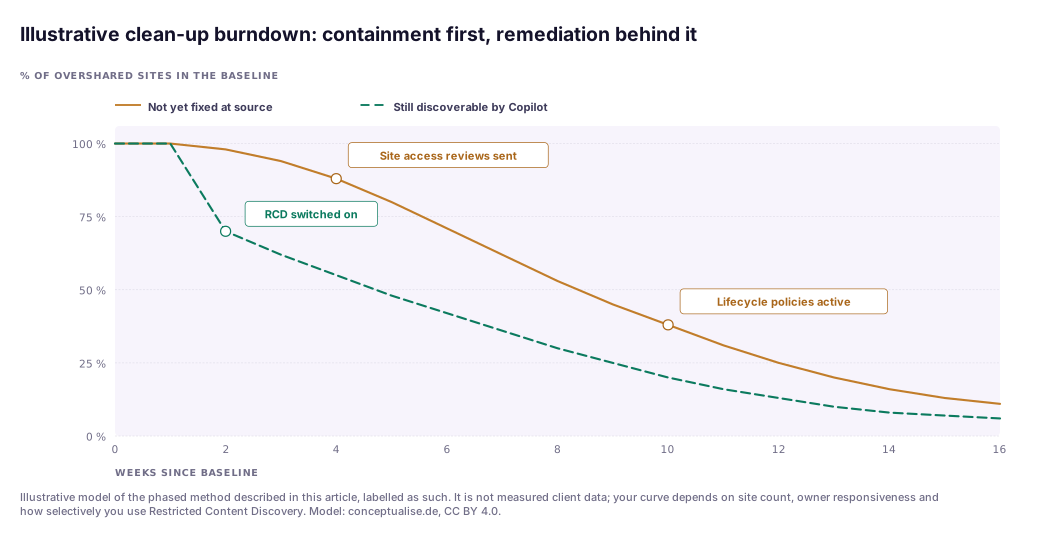
Two readings. First, the gap between the lines is containment. It opens in week two, when RCD goes on the top-risk sites, and it is what lets you keep the Copilot rollout moving while owners work. Second, the amber line is the real risk, and it falls slowly. Owner reviews take weeks, ownerless sites need a decision first, and some sites only clear when a lifecycle policy archives them. If your programme reports only the green line, it is reporting the wrong number.
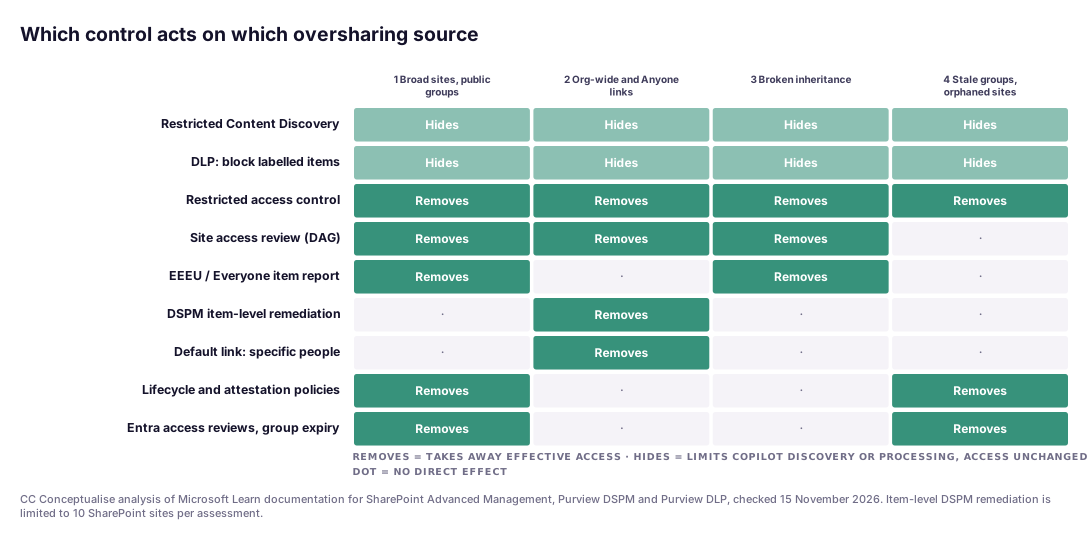
The matrix is our analysis of Microsoft's documentation. Three things stand out. RCD and DLP label blocking cover every source, which is why they are tempting, but they only hide. Only RAC removes access across all four, and only by locking a site to named groups, which suits a handful of sensitive sites, not a tenant. Owner reviews cannot help orphaned sites, and DSPM item-level remediation only touches sharing links. Stale groups and orphaned sites (④) are reached only by lifecycle policies, identity reviews and RAC, which is why those belong in the plan from day one, not in a later "operate" phase.
In a recent engagement…
In a recent engagement with a DACH organisation preparing a broad Copilot rollout, the first DAG baseline produced a list long enough that the steering group's instinct was to delay the rollout until it was clean. We argued for the opposite order. We flagged a short list of sites with HR, legal and finance content using RCD, set a DLP policy for the "Highly Confidential" label, and let the pilot continue.
The remediation then exposed the real problems. A meaningful share of the most exposed sites had no active owner, so their site access reviews could not complete. EEEU had been added to Visitors groups as a standard step in an old site-provisioning script, so the same pattern existed on dozens of sites. And the works council asked, rightly, what the DSPM and audit data would show about individuals. Fixing the provisioning script, running the ownership policy in simulation first and writing the monitoring scope into the works agreement did more than any single feature. None of it was technically hard; all of it needed a decision from outside IT.
Which control when: the decision table
| Control | Lever | Changes access? | Speed | Licence path | Watch out for |
|---|---|---|---|---|---|
| Restricted Content Discovery | Discovery | No | Hours to over a week, by site size | SAM via Copilot licence | Overuse degrades answers; not for OneDrive |
| Restricted SharePoint Search | Discovery | No | n/a | — | Blocked since 31 Jul 2026, retires 31 Jan 2027 |
| Purview DLP, label condition | Processing | No | Up to 4 h per policy change | Purview, per service description | Only labelled items; citations still shown |
| Restricted access control | Access | Yes, site-wide | Up to 1 h to enable, then index latency | SAM via Copilot licence | Channel sites separate; sharing still allowed unless set |
| Site access review | Access | Yes, by owner | Weeks | SAM via Copilot licence | Fails silently on ownerless sites |
| Special-groups item report | Access | Yes, by script | Days | SAM, SAM Administrator role | Re-run every 30 days; 1 M row cap |
| DSPM item-level remediation | Access | Yes, links | Days | Purview, Entra app registration | 10 sites per scan; SharePoint only |
| Sharing link defaults | Access, future | Prevents new | Immediate | Included | Users adapt; communicate first |
| Lifecycle and attestation policies | Access, lifecycle | Yes, read-only or archive | Months | SAM via Copilot licence | Simulate first; check RAC conflicts |
| Entra access reviews, group expiry | Access, identity | Yes | Per review cycle | Entra ID P2 or ID Governance | Reviewers rubber-stamp without context |
On licensing, one Copilot licence assigned to any user unlocks the Copilot-supporting SAM features (details in the FAQ). Check Purview and Entra entitlements against the current service descriptions; they change more often than the features.
Governance for European enterprises
Oversharing is not only a Copilot readiness topic. In the EU it is a compliance finding waiting to happen.
- GDPR. Article 5(1)(f) requires appropriate security of personal data, Article 25 data protection by design and by default, and Article 32 security appropriate to the risk. A personnel file readable by the whole company breaches all three whether or not Copilot finds it. Many data protection officers will expect a data protection impact assessment (Article 35) for the Copilot rollout; the oversharing baseline is the strongest evidence you can put in it.
- Works councils (Germany). Section 87(1) no. 6 of the Works Constitution Act (BetrVG) gives the works council co-determination over technical systems capable of monitoring behaviour or performance. Copilot, Purview audit and DSPM reports that show prompts or user activity can qualify. Put scope, retention and access to reports into the works agreement.
- NIS2. Article 21(2)(i) requires access control policies and asset management. In Germany the NIS2UmsG has applied since 6 December 2025. An organisation that cannot say who can read its sensitive data will struggle to evidence this; see our NIS2 risk management measures on Azure.
- DORA. For financial entities, Article 9(4)(c) of Regulation (EU) 2022/2554 requires limiting logical access to what legitimate, approved functions need. EEEU on a credit-risk site is hard to defend in an audit.
- EU AI Act. For most organisations Copilot is a general-purpose tool used as a deployer, not a high-risk system. The AI literacy duty in Article 4 has applied since 2 February 2025, and teaching users that Copilot can find anything they can open is a good literacy topic.
- EU Data Boundary. Microsoft states that Copilot is an EU Data Boundary service for EU customers, but that models provided by Anthropic as a subprocessor are currently excluded from the boundary. If residency matters, check which models your tenant enables. It does not change oversharing, but it belongs in the same DPIA.
A pragmatic adoption path
- Weeks 1–2: baseline and roles. Assign the SAM Administrator role to a small PIM-protected group. Run the site permissions, special-groups and sharing-links reports, the content management assessment and a DSPM custom assessment. Define "overshared" for your organisation. Inventory any RSS allow-list before it disappears.
- Weeks 2–3: contain. Apply RCD to the short list of high-risk sites, with an owner and exit date for each. Turn on a DLP policy for your top sensitivity label on the Copilot location. Brief the works council and DPO.
- Weeks 3–8: remediate. Send site access reviews in waves with a custom email. Remove EEEU grants by script where the rule is clear. Use DSPM item-level remediation on the 10 most sensitive sites. Fix any provisioning template that creates oversharing.
- Weeks 6–12: change the defaults. Default links to "Specific people", expire "Anyone" links, run ownership and inactive-site policies in simulation and then in active mode, and start Entra access reviews for the groups behind your most sensitive sites.
- Ongoing: operate the loop. Weekly DSPM, monthly activity reports, quarterly snapshots, RCD exits tracked to zero, and a monthly one-page metric for the CISO: sites still overshared at source, not just sites hidden from Copilot.
The verdict
Copilot oversharing is a permissions problem with a deadline attached. The deadline is not 31 January 2027; that is only when one temporary control disappears. The deadline is the moment a user, an agent or an attacker steering an agent asks the right question. Microsoft now ships most of the tools, largely within the Copilot licence. The hard part is organisational: owners who answer, a provisioning process that does not create EEEU by default, and a works agreement that lets you monitor. Contain fast, remediate honestly, and report the number that matters.
If you want help running this, from the first baseline to a works-council-ready monitoring concept, our Zero Trust and cybersecurity practice runs Copilot oversharing clean-ups with European enterprises. Where the clean-up is part of a wider Copilot and agent rollout, our AI practice designs the platform around it.
FAQ
Does Microsoft 365 Copilot give users access to data they could not see before?
No. Microsoft states that Copilot only surfaces organisational data to which the individual user has at least view permissions, and the Semantic Index honours the same identity-based access boundary. The problem is that most tenants grant far more access than anyone intended, through public groups, "Everyone except external users" grants, organisation-wide links and broken inheritance. Copilot makes that existing access easy to find.
What replaces Restricted SharePoint Search?
Restricted Content Discovery. Microsoft blocked new Restricted SharePoint Search enablement from 31 July 2026 and retires the feature fully on 31 January 2027, with the PowerShell cmdlets stopping after 28 February 2027 according to Message Center post MC1395311. Settings are not migrated automatically, so you must flag the sites you want hidden from Copilot and organisation-wide search with Restricted Content Discovery yourself.
Does Restricted Content Discovery fix oversharing?
No. It changes discoverability, not permissions. Content on a flagged site no longer appears in organisation-wide search or Copilot discovery, and the site loses AI entry points, but anyone with access can still open the files directly or via a link. Microsoft describes it as a temporary control while owners review access. Use it to buy time, then remediate permissions at the source.
Do we need extra licences for SharePoint Advanced Management?
Usually not if you deploy Copilot. Microsoft's prerequisites say that once at least one user in the tenant has a Microsoft Copilot licence, SharePoint administrators get the SharePoint Advanced Management features that support Copilot. Alternatives are the SharePoint Advanced Management Plan 1 add-on or Microsoft 365 E7. Some features, such as restricted site creation by apps, still need the Plan 1 add-on, and the sensitivity label report needs E5 or G5.
Can Purview DLP stop Copilot from using confidential files?
Yes, for labelled content. A DLP policy on the Microsoft Copilot, Copilot Chat and Copilot Cowork location can stop Copilot from processing files and emails that carry selected sensitivity labels. The items can still appear as citations, but their content is not used in the answer. Email coverage starts with messages sent on or after 1 January 2025, policy changes can take up to four hours, and unlabelled files are not protected.
Do we need works council approval for a Copilot oversharing clean-up in Germany?
Often, yes. Under section 87(1) no. 6 of the Works Constitution Act, the works council has a say in introducing technical systems that are capable of monitoring employee behaviour or performance. Copilot itself, audit logging and some DSPM and DLP monitoring can fall under it. Agree a works agreement early that covers purpose, logged data, retention and who can see prompt-level reports. This is not legal advice.
Sources
Checked on 15 November 2026. Product capabilities and preview status change frequently; verify in your tenant.
Tier A: primary and regulatory
- Microsoft Learn: Secure and governed data foundation for Microsoft Copilot, foundational deployment guidance (updated 11 November 2026)
- Microsoft Learn: Data, privacy and security for Microsoft Copilot
- Microsoft Learn: Restricted SharePoint Search (retirement notice)
- Microsoft 365 Message Center MC1395311: Retirement of Restricted SharePoint Search (18 June 2026), via merill.net archive
- Microsoft Learn: Restrict discovery of SharePoint sites and content (Restricted Content Discovery)
- Microsoft Learn: Restricted access control for SharePoint sites
- Microsoft Learn: SharePoint Advanced Management features in Microsoft Copilot licences
- Microsoft Learn: Prerequisites for SharePoint Advanced Management
- Microsoft Learn: Data access governance reports
- Microsoft Learn: Sites and files shared via special SharePoint groups report
- Microsoft Learn: Site access reviews
- Microsoft Learn: Inactive site policies
- Microsoft Learn: Prevent oversharing with DSPM data risk assessments
- Microsoft Learn: Purview DLP for Microsoft 365 Copilot and Cowork (updated 9 November 2026)
- Regulation (EU) 2016/679 (GDPR), Art. 5, 25, 32, 35; Directive (EU) 2022/2555 (NIS2), Art. 21; Regulation (EU) 2022/2554 (DORA), Art. 9; Regulation (EU) 2024/1689 (AI Act), Art. 4; Betriebsverfassungsgesetz § 87(1) no. 6
Tier B: analysis and research
Tier C: vendor and directional
Topics