vLLM on AKS: KServe, MIG and GPU Sharing in Production
How to run vLLM on AKS: KServe or KAITO, MIG vs time-slicing vs MPS, KEDA scaling on queue depth and the cold-start maths. Checked against Nov 2026 docs.
On 11 November 2026 Microsoft updated its AKS documentation for multi-instance GPU. The update describes a managed path where AKS installs the NVIDIA driver, the device plugin and the DCGM metrics exporter, and cuts an A100 into hardware partitions for you. Seven weeks earlier, KServe 0.21 had added direct KEDA scaling and scale-to-zero to its LLMInferenceService. vLLM, the engine underneath almost all of this, shipped version 0.32.0 on 18 October. That was its nineteenth minor release this year.
The building blocks for serious LLM inference on Azure Kubernetes Service are now in place. The cost sits in the decisions between them: which GPUs to share and how, what triggers a scale-out, and how long a cold start really takes. This article is for the people who pay the GPU bill and carry the pager: platform leads, cloud architects and CTOs.
TL;DR / Key takeaways
- Three pools, not one. Whole GPUs for tensor-parallel models, MIG slices for small models and embeddings, time-slicing only for dev and test.
- MIG is the only sharing mode that isolates. NVIDIA documents hardware memory and fault isolation for MIG. With time-slicing, one crashing workload takes down every workload on the GPU. MPS sits in between and is still experimental.
- Scale on queue depth, not GPU utilisation. KEDA scales replicas on
vllm:num_requests_waiting; the cluster autoscaler or node auto-provisioning adds GPU nodes. - Cold starts take minutes. Microsoft's KAITO guidance allows up to 10 minutes for a GPU node and up to 20 for a ready workspace. Scale-to-zero is a batch feature.
- The stack moves faster than your change process. We counted 19 vLLM minor versions from January to mid-November 2026. Pin versions and upgrade through a canary.

Download: Editable draw.io file · Open in diagrams.net · Chart data (CSV)
Why this matters now
Until recently, self-hosting an LLM on Kubernetes meant hand-built Deployments, the NVIDIA GPU Operator and hoping the driver survived the next node image upgrade. Three things changed in 2026.
First, AKS took over the GPU plumbing. Microsoft now recommends AKS-managed GPU node pools for most scenarios. With --enable-managed-gpu=true, AKS installs and maintains the NVIDIA driver, the Kubernetes device plugin and the DCGM exporter, and sets the MIG strategy (None, Single or Mixed) at pool creation. The managed MIG path is still a preview (ManagedGPUExperiencePreview), which matters for production sign-off.
Second, the Kubernetes serving layer grew up. KServe's LLMInferenceService is built on llm-d, which reached version 1.0 on 20 October 2026. It combines vLLM with Gateway API routing, a KV-cache-aware endpoint picker and optional prefill/decode disaggregation. Dynamic Resource Allocation, the long-term replacement for counting nvidia.com/gpu units, went GA in Kubernetes 1.34, and KServe 0.21 added DRA resourceClaims to its runtimes.
Third, cost pressure moved from tokens to GPU hours. Teams that moved high-volume, predictable workloads off per-token APIs (we worked through the break-even in our SLM on-prem vs API TCO calculator) now pay for GPUs whether or not they serve requests. GPU sharing and autoscaling are not optimisations. They decide whether the business case holds.
The reference layout, layer by layer
The numbers match the callouts in the hero diagram. The layout assumes one AKS cluster serving several models to internal apps and agents through an OpenAI-compatible API.
① Inference-aware routing at the edge
A normal Kubernetes Service spreads connections without looking at the model's state, which is wrong for LLMs. Requests that share a long system prompt should land on the same replica to reuse the cached prefix, and a replica with a nearly full KV cache should get fewer new requests than an idle one.
The Gateway API Inference Extension (v1.6) solves this with an InferencePool and an endpoint picker (EPP) that reads queue length and KV-cache state from each replica. It runs in the CPU system pool, behind the API gateway you already use for authentication and quotas. Our semantic caching architecture covers the cache layer that can sit in front of it. llm-d 1.0 added priority- and fairness-aware flow control, so a burst of agent calls does not starve the chat front end.
② KServe LLMInferenceService as the control plane
You have three realistic ways to run vLLM on AKS.
- KAITO (the AI toolchain operator add-on). Enable it with
az aks update --enable-ai-toolchain-operator; aWorkspaceresource deploys a preset or custom model on vLLM and provisions GPU nodes. KAITO is a CNCF Sandbox project, and upstream v0.13.0 (24 October 2026) ships vLLM 0.30.0. Microsoft notes the add-on "typically lags one release behind" upstream and needs GPUs with compute capability 8.0 or newer. - KServe
LLMInferenceService. The platform-team option: one resource for the model, vLLM runtime, router, canary rollouts and optional prefill workers. The API is still alpha (v1alpha2in KServe 0.21), so expect field changes. - Plain Deployments. Fine for one or two models, if you build routing, scaling and rollout yourself.
Our rule of thumb: KAITO when one team needs one model quickly, KServe when a platform team serves several models to several consumers. Do not point both controllers at the same GPU pools; each assumes it owns placement.
③ Whole-GPU pools for models that need tensor parallelism
Models too large for one GPU are split across several with tensor parallelism, which only performs well over a fast interconnect. On Azure that means sizes such as ND H100 v5 (eight H100 80 GB GPUs with NVLink 4.0), used whole. Taint these pools and set vLLM's --tensor-parallel-size to the node's GPU count.
Here vLLM's memory features earn their keep: PagedAttention limits KV-cache fragmentation, prefix caching reuses shared prompts, and FP8 KV caches trade a little latency for capacity. The vLLM 0.32 notes report that an FP8 KV cache halves KV memory for GLM-5.x on SM100 at a 7–11% time-to-first-token cost. That is one model on one GPU generation, so measure yours.
④ MIG pools for small models
Multi-instance GPU splits a supported GPU into up to seven partitions with their own streaming multiprocessors and memory. On AKS that means the A100 v4 and H100 v5 families. For the A100 80 GB, Microsoft publishes five uniform profiles, from MIG1g (seven 1g.10gb slices) to MIG7g (the whole GPU).
Three documented facts shape the design.
- Layouts are immutable. "You can't change the profile configuration after MIG node pool creation." A new slice size means a new pool and a migration.
- Single or mixed strategy. With
Single, every slice is anvidia.com/gpuand the name hides the slice size, so use a node selector. WithMixed, each profile has its own resource name (such asnvidia.com/mig-1g.10gb), which is explicit but fragments capacity: "a pod can remain pending even when other partition types are free." - No tensor parallelism across slices. NVIDIA's MIG guide says that with driver R570 only peer-to-peer transfer between MIG instances on the same GPU is supported, and NCCL support for MIG is still experimental. MIG is for models that fit in one slice: quantised 7–8B models, embeddings, rerankers and guard models.
The managed path is az aks nodepool add ... --enable-managed-gpu=true --gpu-mig-strategy Single --gpu-mig-profiles MIG3g, which needs node image 202609.01.0 or later. The older --gpu-instance-profile flag still works with either the managed or your own device plugin, but cannot be combined with --gpu-mig-profiles.
⑤ Time-slicing and MPS: for dev and test, with eyes open
Time-slicing advertises one GPU as several and lets pods take turns. NVIDIA's device plugin documentation is blunt: "nothing special is done to isolate workloads", each workload sees the GPU memory and runs in the same fault domain, "meaning if one workload crashes, they all do." Asking for two time-sliced replicas does not even guarantee a proportional share of compute.
MPS runs clients concurrently and limits each to an equal fraction of memory and compute. Better, but NVIDIA's MPS notes say a fatal fault in one client can bring down others in a multi-user setup, and the device plugin has called MPS experimental since v0.15.0. It does not combine with MIG.
On AKS, neither is part of the managed stack: you create a driver-only pool (--enable-managed-gpu=false) and run the device plugin or GPU Operator yourself. We use time-slicing for dev clusters, notebooks and CI smoke tests, never for anything with an SLA or tenants who must not crash each other.
⑥ Autoscaling on queue depth
LLM servers batch continuously, so GPU utilisation misleads: a server can look busy with headroom to spare, or calm while requests queue behind a full KV cache. The signals that track user experience are vLLM's own metrics: vllm:num_requests_waiting (queue depth), vllm:kv_cache_usage_perc (memory pressure) and the vllm:time_to_first_token_seconds histogram (what users feel).
The loop has two layers. KEDA reads queue depth from Azure Monitor managed Prometheus and sets the replica count; when a replica cannot be scheduled, the cluster autoscaler or node auto-provisioning (NAP) adds a GPU node. A minimal ScaledObject for a plain vLLM Deployment:
apiVersion: keda.sh/v1alpha1
kind: ScaledObject
metadata:
  name: chat-8b-vllm
spec:
  scaleTargetRef:
    name: chat-8b-vllm            # the vLLM Deployment
  minReplicaCount: 1              # keep one warm replica for interactive traffic
  maxReplicaCount: 6
  cooldownPeriod: 600             # GPU nodes are slow to come back; scale in gently
  triggers:
    - type: prometheus
      metadata:
        serverAddress: https://<your-amw>.<region>.prometheus.monitor.azure.com
        query: sum(vllm:num_requests_waiting{model_name="chat-8b"})
        threshold: "4"            # target waiting requests per replica
      authenticationRef:
        name: managed-prometheus  # TriggerAuthentication using Entra workload identity
For an LLMInferenceService, KServe 0.21 wires KEDA in directly and allows idleReplicaCount: 0 for scale-to-zero. Tune the threshold from your time-to-first-token target, not from intuition.
⑦ Model weights and the cold-start budget
A new replica is ready only when the GPU node exists, the image is pulled, the weights are in GPU memory and the kernels are warm. Microsoft's KAITO guidance says machine readiness "can take up to 10 minutes", and workspace readiness up to 20 minutes, depending on model size. That is the number to put next to any scale-to-zero proposal.
Shorten it where you can: store weights in Blob Storage or as OCI artifacts in Azure Container Registry, cache them on node-local NVMe, keep images lean. vLLM 0.32 added vllm download-kernels and vllm preload --preload-autotune, both aimed at startup time. And keep one warm replica for anything a human waits on.
What the numbers say
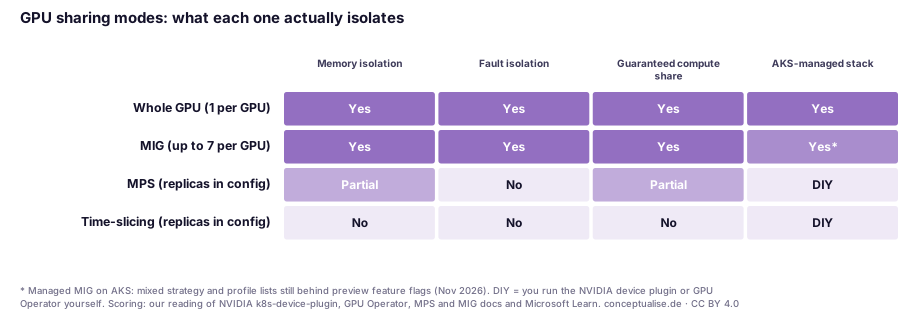
The first chart encodes what NVIDIA and Microsoft document, scored by us; it is not a benchmark. Only whole GPUs and MIG isolate memory and faults, and only those two are managed by AKS (MIG still in preview). MPS is a half-step; time-slicing isolates nothing. Running it in production means choosing density over availability, whether you meant to or not.
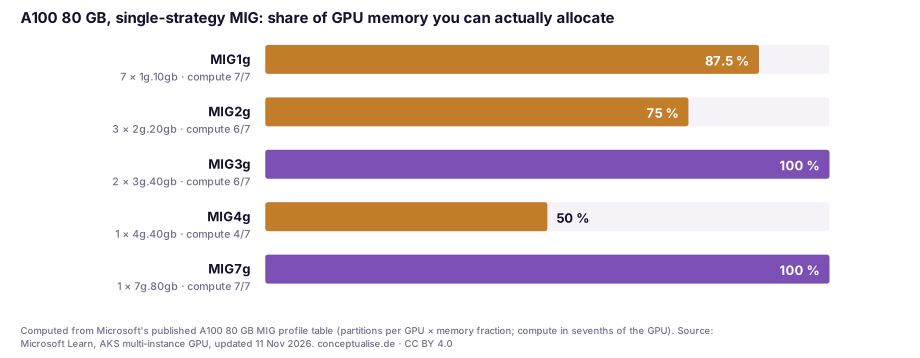
The second chart is arithmetic on Microsoft's A100 80 GB profile table: a uniform layout often strands part of the GPU. MIG1g allocates 70 of 80 GB, MIG2g 60 GB with a seventh of the compute idle, and MIG4g only half the memory and four-sevenths of the compute. Only MIG3g and MIG7g allocate all the memory, and MIG3g still leaves one compute slice unused. Size the profile from the model's memory footprint, then check what you strand.
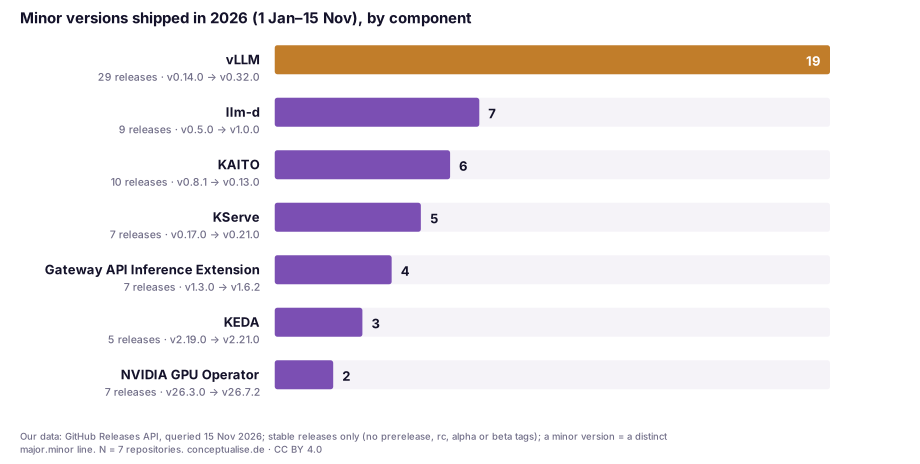
The third chart is our own data: minor versions shipped since 1 January by seven components of this stack, counted from the GitHub Releases API on 15 November 2026 (stable releases only). vLLM shipped 19, from v0.14.0 to v0.32.0, roughly one every two weeks; the control plane around it moves far slower. That is an operations problem. vLLM 0.32 alone dropped Python 3.10, restricted default CORS origins and fixed three security advisories, while the KAITO add-on ships whichever vLLM its release pinned. Pin versions and upgrade canary-first.
In a recent engagement…
A European industrial company asked us to review an AKS inference platform that had grown from one pilot model to a handful. The GPU bill was the trigger. Nothing was careless; it had simply been sized for the pilot.
Every model had its own whole A100, including an embedding model and a small guard model that used a fraction of the memory. The one pool that did share GPUs used time-slicing, because it was the first thing the team got working. A GPU fault in one experimental model had recently taken unrelated services down with it. Autoscaling ran on CPU, the horizontal pod autoscaler default, so the vLLM replicas never scaled. The team compensated by over-provisioning.
The changes were unglamorous. The small models moved to a MIG pool with a uniform MIG3g layout, which fitted every one of them with room for KV cache. Time-slicing went back to the development cluster. Queue-depth scaling replaced CPU scaling, with one warm replica per interactive model and scale-to-zero overnight for the batch-only models. The one large model kept its whole-GPU pool. The longest discussion was not technical: who owns the vLLM version pin, since several teams had been upgrading it independently.
The decision table
This is the part to screenshot.
| Workload | GPU pool | Sharing | Scaling signal | Minimum replicas |
|---|---|---|---|---|
| Large model that needs tensor parallelism (e.g. 70B-class at full or FP8 precision) | Whole GPUs, NVLink (e.g. ND H100 v5) | None | vllm:num_requests_waiting, guard on TTFT p95 | 1 (interactive) |
| Small instruction model, interactive (7–8B, quantised) | MIG, uniform profile sized to model + KV cache | MIG slice | Queue depth per replica | 1 |
| Embeddings, rerankers, guard models | MIG, smallest profile that fits | MIG slice | Queue depth or request rate | 1 |
| Batch summarisation, offline evaluation | Whole GPU or MIG, Spot where tolerable | Per above | Queue depth (or job queue length) | 0 |
| Notebooks, dev, CI smoke tests of serving images | Separate driver-only pool | Time-slicing | None, or schedule-based | 0 |
| Multi-tenant serving across business units with an SLA | Whole GPU or MIG only | Never time-slicing or MPS | Queue depth per tenant pool | 1 per tenant |
Four checks belong in every design review. Is vLLM pinned and upgraded through a canary? Is the MIG layout justified by measured memory? Does any production workload share a fault domain through time-slicing? Has the cold-start time been agreed with the product owner? For a wider view of GPU spend, our guide to controlling GPU and AI workload costs on Azure covers commitments, Spot and scheduling.
Governance for European enterprises
Self-hosting on AKS in an EU region keeps prompts and outputs inside your tenant, which for many DACH organisations is the whole point. It does not remove obligations; it changes who carries them.
GDPR. Self-hosting removes a processor from the chain, but you now own retention of request logs, prompt caches and traces. Put prefix and semantic caches in your records of processing and set retention deliberately.
EU AI Act. Article 50 transparency obligations have applied since 2 August 2026. If your self-hosted model talks to people or generates synthetic content, the disclosure duties apply whoever hosts it. The Annex III high-risk obligations were deferred to 2 December 2027 by Regulation (EU) 2026/1744, which entered into force on 27 July 2026. Use the time to classify use cases, not to postpone the platform's logging.
NIS2. For essential and important entities, an internal inference platform falls under the Article 21 risk-management measures, including vulnerability handling and supply-chain security. A runtime with 19 minor releases in ten months, several with security fixes, needs a documented patch process. Our Kubernetes production best practices cover the baseline controls the GPU pools inherit.
For DORA-regulated financial entities, self-hosting can reduce concentration on a single model API provider. The GPUs, however, still come from one cloud region. Document the fallback.
A pragmatic adoption path
- Weeks 1–2: measure before you slice. For each model, record GPU memory at your target context length and concurrency, tokens per second and time to first token on a whole GPU. Without these numbers, any MIG layout is a guess, and the layout cannot change in place.
- Weeks 3–4: split the pools. Create a whole-GPU pool for large models and a managed MIG pool with one uniform profile for small ones. Move time-slicing to a separate driver-only development pool. Taint everything.
- Month 2: put a router and queue-depth scaling in place. Introduce the Gateway API Inference Extension, through KServe
LLMInferenceServiceor standalone. Replace any CPU- or utilisation-based autoscaling with KEDA onvllm:num_requests_waiting. Enable the cluster autoscaler or NAP on the GPU pools. - Month 2–3: shorten the cold start. Move weights next to the cluster, cache them on node-local disk, measure end-to-end readiness from "pod pending" to "first token", and agree minimum replica counts with product owners based on that number.
- Month 3: industrialise the runtime. Pin vLLM, KServe and KAITO versions in Git. Upgrade through a canary with an evaluation gate, and subscribe the platform team to the vLLM security advisories. Our enterprise agent platform reference architecture shows where this inference layer sits in the wider platform.
The verdict
Running vLLM on AKS is no longer a science project. AKS manages the GPU drivers and MIG partitions, KServe and llm-d bring inference-aware routing and scaling, and KAITO gets a first model running in an afternoon. The hard part is no longer making it work. It is not wasting money once it does.
Our view: whole GPUs for models that need them, MIG for everything that fits in a slice, no time-slicing in production. Scale on queue depth and keep one warm replica wherever a person is waiting. Treat vLLM as a fast-moving, security-relevant dependency. Get those four things right and the GPU bill becomes a design decision instead of a surprise.
If you want a second pair of eyes on your GPU platform, our cloud architecture team runs a fixed-scope AKS inference review. We measure your models, propose the pool and MIG layout, and leave you with the scaling configuration and the decision table filled in for your estate.
FAQ
Should we use KServe, KAITO or plain Deployments to run vLLM on AKS?
KAITO is the fastest route to a working endpoint, though Microsoft notes the add-on typically lags one release behind upstream. KServe's LLMInferenceService suits a platform team serving several models, with inference-aware routing, canary rollouts and, since KServe 0.21, direct KEDA scaling. Plain Deployments are fine for one or two models.
What is the difference between MIG, time-slicing and MPS on AKS?
MIG splits an A100 or H100 into up to seven hardware partitions with documented memory and fault isolation. Time-slicing lets pods take turns on one GPU with no isolation: if one workload crashes, they all do. MPS adds per-client memory and compute limits but is still experimental in the NVIDIA device plugin. AKS manages MIG; time-slicing and MPS need your own device plugin or GPU Operator.
Which metric should trigger autoscaling for vLLM?
Queue depth: vLLM's vllm:num_requests_waiting, with vllm:kv_cache_usage_perc and time to first token as guard rails. GPU utilisation misleads under continuous batching. On AKS, KEDA reads the metric from Azure Monitor managed Prometheus, and the cluster autoscaler or node auto-provisioning adds GPU nodes for pending pods.
Can we scale vLLM to zero on AKS?
Technically yes: KServe 0.21 allows idleReplicaCount: 0 with KEDA. But the first request then waits for a GPU node, the image pull and the model load, and Microsoft's KAITO guidance allows up to 20 minutes for a ready workspace. We keep one warm replica for interactive traffic and scale to zero only for batch and off-hours workloads.
Can we run tensor parallelism across MIG slices?
We would not. NVIDIA's MIG guide says that with driver R570 only peer-to-peer transfer between MIG instances on the same GPU is supported, and NCCL support for MIG is experimental. Put tensor-parallel models on whole GPUs with NVLink, such as ND H100 v5, and keep MIG for models that fit in one slice.
Does self-hosting LLMs on AKS change our EU AI Act or NIS2 obligations?
It changes where the data goes, not whether the rules apply. AI Act Article 50 transparency duties have applied since 2 August 2026; Annex III high-risk obligations moved to 2 December 2027 under Regulation (EU) 2026/1744. For NIS2 entities, the inference platform falls under Article 21 risk-management measures, including patching a fast-moving serving stack.
Sources
All sources checked on 15 November 2026. Release dates and versions come from each project's GitHub Releases page; the release-cadence counts are our own query of the GitHub Releases API on the same day.
Tier A: primary documentation, release notes and regulation
- Microsoft Learn, Create an AKS-managed GPU node pool (updated 11 Nov 2026): https://learn.microsoft.com/en-us/azure/aks/aks-managed-gpu-nodes
- Microsoft Learn, Multi-instance GPU partitioning strategies in AKS: https://learn.microsoft.com/en-us/azure/aks/multi-instance-gpu-overview
- Microsoft Learn, Create a single strategy multi-instance GPU node pool in AKS: https://learn.microsoft.com/en-us/azure/aks/gpu-multi-instance
- Microsoft Learn, Use GPUs on AKS (self-managed setup): https://learn.microsoft.com/en-us/azure/aks/use-nvidia-gpu
- Microsoft Learn, AI toolchain operator add-on (KAITO) on AKS: https://learn.microsoft.com/en-us/azure/aks/ai-toolchain-operator
- Microsoft Learn, ND H100 v5 size series (8 × H100 80 GB, NVLink 4.0, local NVMe): https://learn.microsoft.com/en-us/azure/virtual-machines/sizes/gpu-accelerated/ndh100v5-series
- KEDA 2.21, Prometheus scaler (Azure Workload Identity for Azure Monitor managed Prometheus): https://keda.sh/docs/2.21/scalers/prometheus/
- NVIDIA, Kubernetes device plugin README (time-slicing and MPS): https://github.com/NVIDIA/k8s-device-plugin
- NVIDIA GPU Operator, GPU sharing (time-slicing): https://docs.nvidia.com/datacenter/cloud-native/gpu-operator/latest/gpu-sharing.html
- NVIDIA, MIG user guide: supported profiles, concepts and deployment considerations: https://docs.nvidia.com/datacenter/tesla/mig-user-guide/
- NVIDIA, Multi-Process Service architecture: https://docs.nvidia.com/deploy/mps/architecture.html
- vLLM v0.32.0 release notes (18 Oct 2026): https://github.com/vllm-project/vllm/releases/tag/v0.32.0
- vLLM metrics design documentation: https://docs.vllm.ai/en/latest/design/metrics.html
- KServe v0.21.0 release notes (25 Sep 2026): https://github.com/kserve/kserve/releases/tag/v0.21.0
- KServe, LLMInferenceService overview: https://kserve.github.io/website/docs/model-serving/generative-inference/llmisvc/llmisvc-overview
- KAITO v0.13.0 release notes (24 Oct 2026): https://github.com/kaito-project/kaito/releases/tag/v0.13.0
- llm-d v1.0.0 release notes (20 Oct 2026): https://github.com/llm-d/llm-d/releases/tag/v1.0.0
- Gateway API Inference Extension releases: https://github.com/kubernetes-sigs/gateway-api-inference-extension/releases
- Kubernetes blog, v1.34 DRA updates (DRA core GA): https://kubernetes.io/blog/2025/09/01/kubernetes-v1-34-dra-updates/
- Regulation (EU) 2024/1689 (AI Act), Article 50: https://eur-lex.europa.eu/eli/reg/2024/1689/oj/eng
- Directive (EU) 2022/2555 (NIS2), Article 21: https://eur-lex.europa.eu/eli/dir/2022/2555/oj/eng
Tier B: our data and analysis
- conceptualise.de, release-cadence count via the GitHub Releases API for vllm-project/vllm, llm-d/llm-d, kaito-project/kaito, kserve/kserve, kubernetes-sigs/gateway-api-inference-extension, kedacore/keda and NVIDIA/gpu-operator, 1 Jan to 15 Nov 2026 (method and raw values in the CSV): https://www.conceptualise.de/blog/kubernetes-ai-inference-vllm-kserve-aks/data.csv
- conceptualise.de, MIG allocation arithmetic from Microsoft's A100 80 GB profile table (same CSV)
Tier C: vendor, directional
- vLLM pull-request benchmarks quoted in the v0.32.0 release notes (single model, single GPU generation; directional only)
Topics