Enterprise Browser Security: Extensions, DLP, Sessions
Enterprise browser security in 2026: control extensions, bind sessions to devices and add in-browser DLP. Five controls and every option compared.
On 24 December 2024, an employee at Cyberhaven received an email that appeared to come from Chrome Web Store developer support. It warned that the company's extension would be removed for a policy violation. The button led to a genuine Google OAuth consent screen for an app called "Privacy Policy Extension". One click later, the attacker could publish Cyberhaven's browser extension. The malicious version passed store review, auto-updated onto customers' browsers and stayed live for about 24 hours. Cyberhaven sells data loss prevention.
Researchers tied the same campaign to at least 35 extensions with roughly 2.6 million users. The payload went after Facebook ad and business accounts, session cookies included. That is the point: your users' most valuable credentials now sit in the browser, as cookies that have already passed MFA. This article is for the people who decide what that browser may do: CISOs, security architects and workplace leads. We lay out the five controls of a browser control plane, compare the options and say which we would buy.
TL;DR / Key takeaways
- The browser is the endpoint now. SaaS, GenAI and admin consoles all run in it, and a valid session cookie is worth more to an attacker than a password.
- Extensions are an unmanaged supply chain. Default-deny with an allow-list, blocked permissions and blocked hosts, or one phished developer pushes code into every browser you own.
- Bind sessions to the device. Chrome 145 shipped Device Bound Session Credentials and Entra token protection covers native apps. Browser coverage is still partial, so plan for the gap.
- DLP has moved into the browser. Edge for Business with Purview and Chrome Enterprise Premium inspect paste, upload and GenAI prompts where data actually leaves.
- Most enterprises don't need a new browser. Governed Edge or Chrome covers managed devices. Buy a dedicated enterprise browser for BYOD, contractors and VDI replacement.

Download: Editable draw.io file · Open in diagrams.net · Chart data (CSV)
Why the browser matters now
Email, CRM, finance, source control and cloud consoles now live behind a browser tab. So does the newest data-loss channel, the GenAI prompt box.
Attackers followed. In July 2022 Microsoft documented an adversary-in-the-middle (AiTM) phishing campaign that had targeted more than 10,000 organisations since September 2021. A proxy relayed the MFA challenge and kept the session cookie. Microsoft saw one attacker move from stolen cookie to payment fraud in as little as five minutes. Infostealer malware does the same from the endpoint. Google's April 2024 announcement of device-bound sessions noted that stolen cookies keep working even after the malware is removed.
Cyberhaven opened the second front. Extensions can read pages and cookies, update silently and come from a store that a phished developer can publish to. Our ITDR guide to token theft and AiTM phishing covers the identity side; this is the endpoint side of the same problem.
The five controls of a browser control plane
In the hero diagram, a cloud control plane pushes policy, the browser enforces it in a managed work profile, and apps accept only sessions bound to that device.
① Policy baseline and managed profile
Make the browser a managed asset, not a user choice. Both mainstream browsers have a free cloud management plane: Chrome Enterprise Core in the Google Admin console and the Microsoft Edge management service in the Microsoft 365 admin center. Microsoft notes that GPO or MDM settings win when they conflict with the cloud service, so decide which plane owns which setting.
Our baseline is short: forced sign-in to a work profile, auto-update, Safe Browsing, and a decision on which browsers may reach corporate apps at all. Boring, and the precondition for everything else.
② In-browser DLP and last-mile controls
Network DLP struggles with encrypted, JavaScript-assembled traffic. The browser is the last point where the user action is visible: a paste, an upload, a print.
Microsoft builds Purview DLP into Edge for Business without onboarding the device to Purview. On Intune-managed Windows devices it can audit or block text and file uploads, pasted prompts included, to a named list of unmanaged AI apps, including consumer ChatGPT, Gemini, DeepSeek and Perplexity. For Entra-connected apps it controls copy, paste, download and print. The documentation is candid about limits: Edge 144 or later, up to 4 MB of text and 3 MB per file inspected, and some AI apps send encoded content that can slip through. Chrome Enterprise Premium, at $6 per user per month, offers comparable DLP, URL filtering for GenAI sites, watermarking and screenshot restrictions. To find where sensitive data sits in the first place, see our DSPM guide.
③ Extension allow-list
This control would have neutralised the Cyberhaven wave for most enterprises. Chrome and Chromium-based Edge share the ExtensionSettings policy:
- Set the wildcard
*entry toinstallation_mode: blocked, then allow specific IDs. Moderemovedalso uninstalls what users already have. blocked_permissionsrefuses extensions that request API permissions you disallow.runtime_blocked_hosts, up to 100 patterns, stops even approved extensions from injecting scripts into or reading cookies from your identity provider and finance apps.minimum_version_requireddisables known-bad versions quickly, including force-installed ones.
An allow-list does not stop a malicious update to an extension you approved; Cyberhaven's was a legitimate security product. So review matters as much as policy: check publisher, permissions and update history, keep the list short, re-review when permissions change. Edge's cloud policies add a request-and-approve workflow.
④ Session binding
A stolen cookie is only valuable if it works on another machine. Session binding removes that.
Google's Device Bound Session Credentials (DBSC) shipped in Chrome 145, stable since 10 February 2026, after origin trials from Chrome 135. Chrome keeps a private key in a TPM where one exists. The site issues short-lived cookies, ten minutes in Google's example, and Chrome must sign a challenge to refresh them.
The catch: DBSC protects only sites that implement it, and devices without secure hardware fall back to normal cookies. On the Microsoft side, Entra token protection is generally available for native Windows apps that access Exchange Online, SharePoint Online and Teams. For browsers it is in preview and limited to a few web apps that call Azure Resource Manager, such as the Azure portal and the Entra and Intune admin centres. It needs recent Windows 11 or MDM-managed macOS, Edge or Chrome, and the Microsoft Single Sign On extension. Bind what you can, and cover the rest with phishing-resistant MFA, as in our passwordless FIDO2 guide, plus short sign-in frequency.
⑤ Telemetry and response
Ship browser events to the SIEM: extension installs and permission changes, DLP verdicts, sign-ins to unmanaged profiles. Then rehearse the two actions an extension incident needs: remove the extension everywhere through policy, and revoke the sessions it could have touched. Microsoft notes that new Purview policies reach already signed-in users only once their token expires, so revocation is part of the response.
What the comparison says
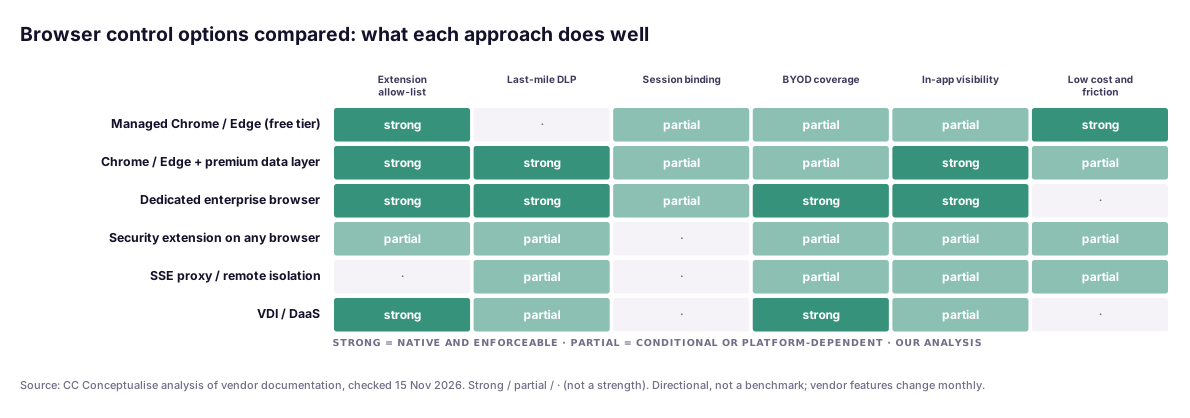
The matrix is our reading of vendor documentation, not a benchmark. First, free managed Chrome or Edge already gives you a strong extension allow-list; most organisations we meet have not switched it on. Second, session binding is only "partial" everywhere, because it depends on each app supporting DBSC or token protection, and network-side options cannot bind a browser cookie at all. Third, dedicated enterprise browsers win on BYOD and in-app visibility, and pay for it in licence cost and change management.
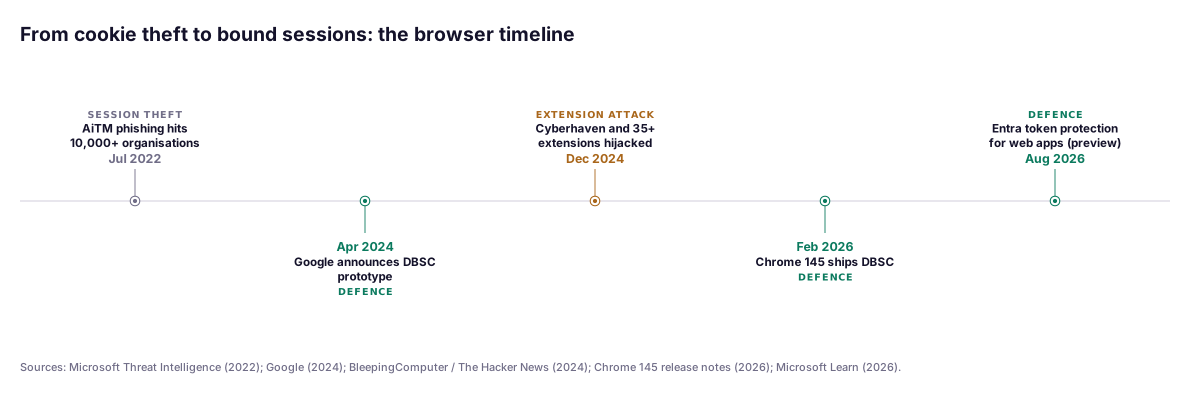
The timeline explains the urgency. Attackers industrialised session theft years before browsers could bind sessions, and the defences are still rolling out app by app.
In a recent engagement…
During a zero trust review for a European manufacturer, we pulled the extension inventory from their managed Chrome fleet as a side task. The team expected a few dozen extensions. The real list was several times longer: coupon tools, screen recorders and "PDF converters" allowed to read every page on every site. None had been reviewed, and several had changed owner since installation.
The fix took three weeks. We kept what had a named business owner, force-installed the password manager and SSO extension, blocked everything else and added blocked hosts for the identity provider and ERP portal. The hardest part was agreeing who owns the allow-list afterwards.
Choosing your option
| Situation | Our default choice | Why |
|---|---|---|
| Managed Windows/macOS fleet, Microsoft 365 E5 | Edge for Business + Purview DLP + Edge management service | DLP and extension control already licensed; token protection native to the stack |
| Managed fleet, Google Workspace or mixed | Chrome Enterprise Core, plus Premium where DLP is needed | Free management plane; pay only for the DLP population |
| Contractors, BYOD, M&A day-one access | Dedicated enterprise browser (Island, Prisma Browser) | Isolates corporate work on a device you do not manage |
| Browser-only workloads on VDI | Pilot a dedicated enterprise browser | Similar data controls at lower infrastructure cost; test first |
| Admin access to cloud consoles | Managed Edge/Chrome + token protection for ARM + privileged access workstation | Bound sessions on the highest-value consoles |
| A security extension only | Bridge, not end state | Cannot fully govern other extensions or bind sessions |
Governance for European enterprises
NIS2. Article 21(2) of Directive (EU) 2022/2555 lists "access control policies and asset management" in point (i) and "the use of multi-factor authentication or continuous authentication solutions" in point (j). Unreviewed extensions are an asset-management gap; a cookie that bypasses MFA undermines point (j). Our NIS2 risk-management measures guide maps the full list.
GDPR and German co-determination. Browser telemetry and DLP inspect what employees do, which usually means a data protection impact assessment. In Germany, Section 87(1) no. 6 of the Works Constitution Act (BetrVG) gives the works council co-determination over technical systems designed to monitor employee behaviour or performance. Involve it early, agree retention and access, and prefer aggregated reporting.
DORA. For financial entities, the same controls are evidence for access control and data leakage prevention in the ICT risk framework. They also fit naturally into a zero trust architecture.
A pragmatic adoption path
- Weeks 1–2: inventory. Pull browser versions and the full extension list from every fleet. Find who reaches corporate apps from unmanaged browsers.
- Weeks 3–4: baseline and allow-list. Enforce the work profile, auto-update and Safe Browsing. Move extensions to default deny, with blocked hosts for the identity provider and finance apps.
- Month 2: sessions. Enforce phishing-resistant MFA, shorten sign-in frequency for sensitive apps and pilot token protection in report-only mode. Ask SaaS vendors about DBSC.
- Month 3: data. Turn on in-browser DLP for GenAI uploads and pastes in audit mode. Agree policy and reporting with the works council and DPO before switching to block.
- Month 4: the unmanaged edge. Decide how contractors and BYOD reach sensitive apps. Pilot a dedicated enterprise browser for that group only, and compare it with your VDI costs.
The verdict
The browser became the endpoint quietly. The fix is not glamorous and mostly not expensive. Default-deny extensions this quarter; it costs nothing on managed Chrome or Edge. Bind sessions where platforms allow, and treat the rest as a known gap covered by phishing-resistant MFA. Put DLP where data actually leaves: the paste box.
Dedicated enterprise browsers are good products for a specific problem, unmanaged devices. For a managed Microsoft or Google estate, the browser you already have, properly governed, gets you most of the way.
If you want help with the policy baseline or the extension inventory, our zero trust team runs this as a short, fixed-scope assessment. You leave with the five controls mapped to your estate.
FAQ
What happened in the Cyberhaven Chrome extension compromise?
On 24 December 2024 an attacker phished a Cyberhaven employee with an email posing as Chrome Web Store developer support. It led to a real Google OAuth consent page for a malicious app that gained the right to publish the company's extension. The malicious version passed store review and stayed live for about 24 hours. The same campaign hit at least 35 extensions with roughly 2.6 million users.
Do we need a dedicated enterprise browser like Island or Prisma Browser?
Not by default. On managed Windows and macOS devices, a governed Edge or Chrome with an extension allow-list, in-browser DLP and session binding covers most needs. A dedicated enterprise browser earns its cost when contractors, BYOD or M&A users need sensitive apps from devices you do not manage, or when you want to retire VDI for browser-only work.
What are Device Bound Session Credentials (DBSC)?
DBSC binds a web session to the device. Chrome keeps a private key in secure hardware such as a TPM, the site issues short-lived cookies, and Chrome must sign a server challenge to refresh them. A stolen cookie expires within minutes and cannot be renewed elsewhere. DBSC shipped in Chrome 145, stable since 10 February 2026, but each website must implement it server-side.
Does Entra token protection stop cookie theft in the browser?
Only partly, as of November 2026. Token protection is generally available for native Windows apps that access Exchange Online, SharePoint Online and Teams. For browsers it is in preview and limited to a few web apps that call Azure Resource Manager, such as the Azure portal, with Edge or Chrome and the Microsoft Single Sign On extension. Cover everything else with phishing-resistant MFA and short sign-in frequency.
How should we manage browser extensions in an enterprise?
Default deny. In Chrome and Edge, set the ExtensionSettings wildcard entry to blocked, then allow specific extension IDs after reviewing permissions, publisher and update history. Use blocked_permissions and runtime_blocked_hosts to keep approved extensions away from your identity provider and finance apps. An approved extension can still turn malicious through an update, so monitor changes too.
Is browser monitoring allowed under German works council rules?
It needs agreement. Section 87(1) no. 6 of the Works Constitution Act gives the works council co-determination over technical systems designed to monitor employee behaviour or performance, and browser telemetry and DLP logs qualify. Under GDPR you will usually need a data protection impact assessment. Agree purpose, retention and access before you switch on detailed reporting.
Sources
All sources checked on 15 November 2026. Vendor capabilities change monthly; the comparison chart is our analysis of the documentation as it stood on that date.
Tier A: primary, vendor documentation and regulatory
- Chrome 145 release notes, Device Bound Session Credentials (stable 10 Feb 2026): https://developer.chrome.com/release-notes/145
- Chrome for Developers, Device Bound Session Credentials: https://developer.chrome.com/docs/web-platform/device-bound-session-credentials
- Chrome for Developers, DBSC origin trial (from Chrome 135): https://developer.chrome.com/blog/dbsc-origin-trial
- W3C WebAppSec, DBSC explainer: https://github.com/w3c/webappsec-dbsc
- Google Chrome Enterprise help, ExtensionSettings policy: https://support.google.com/chrome/a/answer/9867568
- Microsoft Learn, Token protection in Conditional Access: https://learn.microsoft.com/en-us/entra/identity/conditional-access/concept-token-protection
- Microsoft Learn, Token protection deployment guide for web apps (preview): https://learn.microsoft.com/en-us/entra/identity/conditional-access/deployment-guide-token-protection-web-apps
- Microsoft Learn, Microsoft Edge management service: https://learn.microsoft.com/en-us/deployedge/microsoft-edge-management-service
- Microsoft Learn, Data loss prevention for cloud apps in Edge for Business: https://learn.microsoft.com/en-us/purview/dlp-browser-dlp-learn
- Directive (EU) 2022/2555 (NIS2), Article 21: https://eur-lex.europa.eu/eli/dir/2022/2555/oj/eng
- Betriebsverfassungsgesetz, § 87: https://www.gesetze-im-internet.de/betrvg/__87.html
Tier B: research and threat intelligence
- Microsoft Threat Intelligence, "From cookie theft to BEC" (12 Jul 2022): https://www.microsoft.com/en-us/security/blog/2022/07/12/from-cookie-theft-to-bec-attackers-use-aitm-phishing-sites-as-entry-point-to-further-financial-fraud/
- Google, "Fighting cookie theft using device bound sessions" (2 Apr 2024): https://blog.google/chromium/fighting-cookie-theft-using-device/
Tier C: vendor and news, directional
- BleepingComputer, how hackers hijacked 35 Google Chrome extensions: https://www.bleepingcomputer.com/news/security/new-details-reveal-how-hackers-hijacked-35-google-chrome-extensions/
- The Hacker News, Chrome extensions hacked in the Cyberhaven campaign: https://thehackernews.com/2024/12/16-chrome-extensions-hacked-exposing.html
- Google, Chrome Enterprise Core: https://chromeenterprise.google/products/chrome-enterprise-core/
- Google, Chrome Enterprise Premium: https://chromeenterprise.google/products/chrome-enterprise-premium/
- Palo Alto Networks, Prisma Browser: https://www.paloaltonetworks.com/sase/prisma-access-browser
- Island, The Enterprise Browser: https://www.island.io/
Topics