AiTM Phishing and Token Theft: An ITDR Playbook
AiTM phishing steals signed-in sessions, not passwords. We map its six stages to the Entra controls that break them: passkeys, Token Protection, CAE, ITDR.
In March 2026, Microsoft and law-enforcement partners disrupted the servers behind Tycoon2FA, one of the busiest phishing-as-a-service kits of the past two years. According to the Microsoft Digital Defense Report 2026, Tycoon2FA activity had fallen 95% from its November 2025 peak by June. That is a real win, but no reason to relax. The technique Tycoon2FA sold, adversary-in-the-middle (AiTM) phishing, is open source, cheap and still works against most MFA deployments we review.
AiTM phishing does not steal a password. It steals the session that the password and the MFA prompt produced. This playbook is for the people who own that problem: CISOs, identity architects, Microsoft 365 platform owners and SOC leads. We take the attack apart in six stages, map each stage to the Microsoft Entra control that breaks it, and show where identity threat detection and response (ITDR) has to catch what prevention misses.
TL;DR / Key takeaways
- MFA is not the finish line. AiTM proxies relay the password and the MFA approval in real time and capture the session cookie. Push, SMS and one-time codes do not stop it, because the user really did complete them.
- Phishing-resistant MFA breaks the relay. Passkeys, Windows Hello for Business and certificate-based authentication are bound to the real sign-in origin. Put them first on admins, finance and executives.
- Stolen tokens need a second layer. A token taken after a legitimate sign-in, for example by an infostealer, bypasses even passkeys. A compliant-device requirement, Token Protection and Continuous Access Evaluation (CAE) limit where a stolen session can be replayed.
- Know the coverage gaps. As of November 2026, Token Protection is GA for native apps but browser support is preview-only for Azure Resource Manager web apps. CAE covers Exchange, SharePoint, Teams and Graph, not every app.
- ITDR is how you catch the rest. Entra ID Protection, Defender XDR and attack disruption already detect AiTM and token replay. Most organisations have not licensed, tuned or wired them to a response runbook.

Download: Editable draw.io file · Open in diagrams.net · Chart data (CSV)
Why this matters now
The headline numbers moved this year. Verizon's 2026 Data Breach Investigations Report says exploitation of vulnerabilities is now the most common initial access vector, at 31% of breaches. Credential abuse, the previous leader, dropped to 13%. Phishing held at 16%. Read only that, and identity looks less urgent.
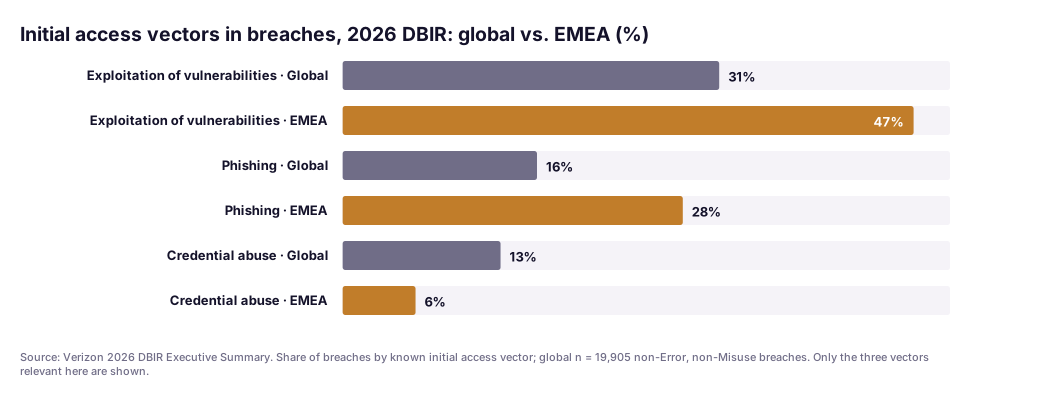
Read on and it doesn't. Globally, phishing and credential abuse together still account for roughly as many breaches as exploitation. In the DBIR's EMEA data, phishing is the initial vector in 28% of breaches, against 6% for credential abuse. That matches what we see in European Microsoft 365 estates: attackers phish for a live session rather than buy a password that MFA will block. The Microsoft Digital Defense Report 2026 found that 52.2% of valid-account intrusions involved follow-on credential theft, and it counts more than 145 million QR-code phishing attacks detected by Defender for Office 365 between July 2025 and June 2026.
The defensive side moved too. Entra ID now supports synced and device-bound passkeys in every edition, including Free. Token Protection is now listed as generally available for native apps on Windows and Apple platforms. CAE has had strict location enforcement in preview. The tools to break the AiTM chain exist. The gap is deployment.
The AiTM kill chain, stage by stage
The numbers below match the warm callouts in the hero diagram, the letters the green controls. AiTM is not new: in July 2022 Microsoft described a campaign that had attempted to target more than 10,000 organisations since September 2021, using the open-source Evilginx2 kit to proxy the Office 365 sign-in page. The mechanics have barely changed. The packaging has: phishing-as-a-service kits now rent out proxy, hosting and anti-analysis CAPTCHA by the month.
① Lure
The attack starts with a link: an email, a PDF with a QR code, or increasingly a Teams message from a compromised partner tenant. Kits put a CAPTCHA or bot check in front of the proxy so automated URL scanners see nothing. Microsoft reports that Tycoon2FA's share of CAPTCHA-gated phishing fell from 76% to 12% after the disruption, so a single kit had dominated that trick. QR codes move the click to a phone, outside most corporate web filtering. Mail and web filtering (Safe Links, SmartScreen, Global Secure Access web content filtering) catches known kits. Treat it as a filter that lowers volume, not a control you can rely on.
② Relay
The page is pixel-perfect because it is the real page, served through the attacker's reverse proxy. The user enters a password, sees the genuine MFA prompt, approves it, and the proxy relays everything. Nothing looks wrong to the user, or to Entra, apart from the IP address.
Phishing-resistant MFA (A) is the control that breaks this stage. Passkeys (FIDO2), Windows Hello for Business and certificate-based authentication are bound to the origin they were registered for. The browser will not produce an assertion for login.microsoftonline.com on a page served from a look-alike domain, so the relay has nothing to forward. In Entra this is the built-in Phishing-resistant MFA authentication strength. Note that Microsoft Authenticator phone sign-in counts as passwordless, but not as phishing-resistant.
Synced passkeys are still phishing-resistant, but they don't support attestation, and NIST SP 800-63B-4 bars syncable authenticators from AAL3. Our rule of thumb: synced passkeys for the broad workforce, device-bound passkeys or security keys with attestation enforced for admins. Entra passkey profiles let you set exactly that per group.
③ Capture
Entra issues a session cookie to whatever completed the sign-in: the proxy. It keeps a copy and passes the user through to their mailbox.
Conditional Access requiring a compliant device (B) stops issuance here for any resource it covers. The proxy-mediated sign-in comes from the attacker's machine, which is not enrolled in Intune and cannot prove device identity, so Conditional Access refuses. Microsoft recommended exactly this in its 2022 AiTM analysis, and it is still the cheapest strong control for organisations that already manage their endpoints. The catch is coverage. Every exclusion for "webmail from home" or "contractors on personal laptops" is an open lane for AiTM. For those populations, phishing-resistant MFA has to carry the load alone.
④ Replay
The attacker imports the cookie into their own browser and opens Outlook on the web. No prompts, because the session already carries the MFA claim. An infostealer that lifts tokens from a user's device reaches the same stage without any phishing, which is why replay needs controls of its own.
Token Protection (C) makes sign-in session tokens device-bound. With it enforced, Entra accepts only refresh tokens that are cryptographically bound to the device they were issued to, through the Primary Refresh Token. A stolen token presented from another device is rejected. As of November 2026, Microsoft Learn lists it as generally available for native applications on Windows, iOS/iPadOS and macOS, for Exchange Online, SharePoint Online and Teams, plus Azure Virtual Desktop and Windows 365 on Windows. Browser support is in preview and limited to selected web apps that access Azure Resource Manager. The Apple device section of the same page still carries a preview label, so check before you enforce. Microsoft's Windows deployment guide adds a warning worth repeating: because enforcement only exists for Windows and Apple, also block unknown platforms and require compliance on the rest, or an attacker simply presents as another platform. In practice Token Protection mostly defends against infostealer token theft from native apps; against browser-based AiTM it is not your primary control yet. The long-term browser answer is W3C Device Bound Session Credentials, which bind cookies to a device key. As of 9 November 2026 it is still an Editor's Draft.
Continuous Access Evaluation (D) works at the resource. CAE-aware services (Exchange Online, SharePoint Online, Teams and, for policy evaluation, Microsoft Graph) sync IP-based Conditional Access location policies. They reject a token presented from an IP outside the allowed ranges, and Microsoft says IP enforcement is instant. Two caveats. CAE only understands IP-based named locations, not country locations or MFA trusted IPs. And in standard mode it tolerates split-path networks, which leaves a replay gap. Strict location enforcement, still in preview, removes that exception where egress IPs are stable; Global Secure Access offers a compliant-network check instead.
⑤ Persist
Sessions expire and passwords get reset, so a competent operator makes themselves durable first. Common moves: register a new MFA method, join or register a device to get a Primary Refresh Token, consent to a malicious OAuth app, or create an inbox rule that hides replies. Storm-2372's device-code phishing campaign is a clear example. Within a day of Microsoft's first report, the actor switched to the Microsoft Authentication Broker client ID so it could register a device and obtain a Primary Refresh Token. Microsoft's July 2026 update assesses Storm-2372 as an initial-access sub-cluster of Midnight Blizzard.
Strong authentication to register (E) breaks this stage. Use Conditional Access user actions for registering security information and for registering or joining devices, and require the phishing-resistant authentication strength or a compliant device for both. A replayed session cookie carries an MFA claim, but it does not let the attacker produce a fresh passkey assertion. Add the controls Microsoft recommends after Storm-2372: block device code flow wherever you can and restrict who may register devices. We would also restrict user consent to OAuth apps from verified publishers.
⑥ Act
Usually the objective is invoice fraud from a real mailbox, data theft from SharePoint, or internal phishing that starts the chain again one hop further in. Microsoft's 2022 write-up described payment fraud starting within minutes of the first sign-in. When the payment request arrives by cloned voice or video instead of email, the controls sit in the finance process; our deepfake CEO fraud playbook covers them. This is where CAE earns its keep a second time: critical events such as a disabled account, a password reset, revoked sessions or high user risk make CAE-aware services reject the still-valid token. Microsoft says propagation can take up to 15 minutes.
Across stages ③ to ⑥: ITDR (F)
Prevention will have gaps. In a Microsoft estate, the detection and response building blocks are already in the box:
- Entra ID Protection has an Attacker in the Middle detection, which Microsoft calls high precision. It raises the user to high risk when a session is linked to a malicious reverse proxy. It is calculated offline and, per Microsoft Learn, needs Microsoft 365 E5 with EMS E5. Anomalous token flags session and refresh tokens with unusual lifetimes or replayed from unfamiliar locations, and Suspicious credential addition fires in real time on a suspicious new MFA method. Both need Entra ID P2.
- Defender XDR, with the Defender for Cloud Apps connectors, raises "Stolen session cookie was used" and "Possible AiTM phishing attempt".
- Automatic attack disruption covers AiTM as a scenario. It can revoke user sessions, disable the user and contain devices automatically when correlation confidence is high.
- Risk-based Conditional Access closes the loop: phishing-resistant reauthentication, sign-in frequency every time, for medium or higher sign-in risk; block or remediate high-risk users.
The response order matters. Revoke sessions and remove persistence (new methods, devices, OAuth grants, inbox rules) together. Otherwise the attacker re-enters with the MFA method they registered at stage ⑤. Our incident response playbook for Azure covers the wider process.
What the numbers say
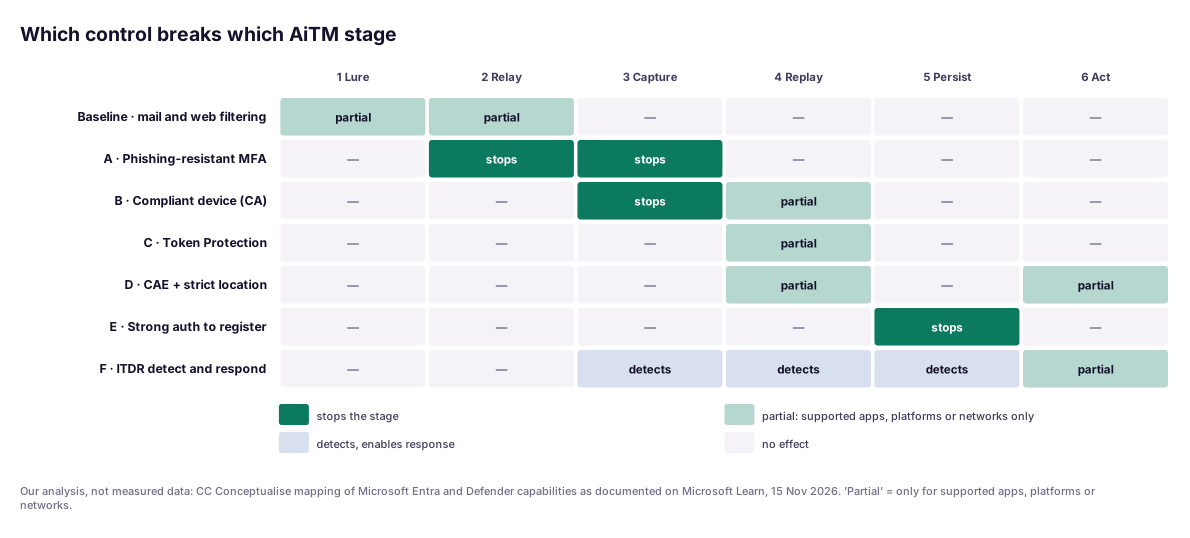
The heat grid is our analysis of what Microsoft documents, not measured data. Three readings stand out.
First, phishing-resistant MFA and a compliant-device requirement are the only controls that stop the attack before the attacker holds a session. Apart from the registration lock at stage ⑤, everything after stage ③ is partial or detective. That is the honest shape of token-theft defence in November 2026: once a valid token is out, you mostly limit where it works and how long it lives.
Second, the replay column has three "partial" cells and no "stops". Token Protection, CAE and the compliant-device check each cover a different subset of apps, platforms and networks. Layering them is how you get coverage, not redundancy.
Third, the persistence column is easy to win, because one Conditional Access user-action policy stops it. Of all the controls here, it is the one we most often find missing.
In a recent engagement…
During an identity-threat review this year for a mid-sized DACH industrial group, we walked the six stages against their Microsoft 365 tenant. On paper they were in good shape: MFA for everyone, Conditional Access, Defender for Office 365, a 24/7 SOC.
In practice, every stage had a lane open. MFA was Authenticator push, so stage ② relayed cleanly. The compliant-device policy excluded browser access from unmanaged devices "for webmail", which covered most of the sales force. Anyone could register a new MFA method from an existing session. Entra ID Protection was licensed for only part of the workforce, so the SOC saw "Additional risk detected" with no detail for many users. And the SOC's playbook for a compromised account said "reset password". It did not mention revoking sessions or checking for newly registered methods.
None of the fixes were exotic. Admins and finance moved to device-bound passkeys, with a dated rollout plan for everyone else. The registration user actions went behind phishing-resistant MFA, the webmail exclusion was replaced by a compliant-network check, Token Protection started in report-only mode, and the playbook now reads revoke, remove persistence, reset, review. The hardest conversation was with sales leadership about the webmail exclusion. The AiTM sequence diagram settled it faster than any policy document.
The control checklist
This is the screenshot-able part. Breaks stage refers to the numbered stages above.
| # | Control | How to implement in Entra (Nov 2026) | Breaks stage | Gaps to know |
|---|---|---|---|---|
| A | Phishing-resistant MFA | Authentication strength "Phishing-resistant MFA"; passkey profiles (device-bound + attestation for admins, synced for the workforce) | ② ③ | Does nothing against tokens stolen after a legitimate sign-in |
| B | Compliant device | Conditional Access grant "Require device to be marked as compliant", all resources | ③ (④ partly) | Every exclusion for unmanaged devices is an open lane |
| C | Token Protection | Conditional Access session control; pilot in report-only, then enforce | ④ (partly) | Native apps; browser only in preview for ARM web apps; needs PRT |
| D | CAE + location | IP-based named locations incl. IPv6; strict location enforcement (preview) or Global Secure Access compliant network | ④ ⑥ (partly) | CAE-aware apps only; no country locations; guests not covered |
| E | Strong auth to register | Conditional Access user actions "Register security information" and "Register or join devices" with phishing-resistant strength; block device code flow | ⑤ | Must also cover OAuth consent separately |
| F | ITDR detect + respond | ID Protection risk policies; Defender XDR with Defender for Cloud Apps connectors; attack disruption enabled | ③–⑥ (detects) | Detail needs P2; Attacker in the Middle needs M365 E5 + EMS E5 |
| — | Mail and web filtering | Safe Links, SmartScreen, web content filtering | ① ② (partly) | QR codes on phones bypass most of it |
Two warnings. Microsoft's known-issues list shows that authentication strength and sign-in frequency can be satisfied at different times, so test step-up flows end to end. And put an enforcement date on every report-only policy when you create it.
Governance for European enterprises
None of the three regimes that apply to most of our clients names phishing-resistant MFA. All three make it hard to justify anything weaker for high-risk roles.
NIS2. Article 21(2)(j) of Directive (EU) 2022/2555 requires essential and important entities to use "multi-factor authentication or continuous authentication solutions" where appropriate. Point (i) adds access control policies. In Germany these duties sit in Section 30 of the BSI Act (BSIG) via the NIS2 Implementation Act, in force since 6 December 2025. A successful AiTM compromise of a mailbox used for operations can also be a significant incident under Article 23, with a 24-hour early warning. Our NIS2 24/72-hour reporting runbook covers that clock.
DORA. Article 9(4)(d) of Regulation (EU) 2022/2554 requires financial entities to implement strong authentication mechanisms. Article 21 of Commission Delegated Regulation (EU) 2024/1774 makes this concrete: authentication methods proportionate to the risk, and strong authentication "in accordance with leading practices and techniques" for remote access, privileged access, critical-function ICT assets and publicly accessible ICT assets. Once AiTM kits are sold as a service, we would argue push MFA no longer meets "leading practices" for privileged access.
GDPR. A mailbox takeover is usually a personal-data breach too. Article 33 gives you 72 hours to notify the supervisory authority, so involve the data protection officer early.
The practical habit is evidence: export your authentication-strength policies, keep the risk reports and record when each control moved from report-only to enforced.
A pragmatic adoption path
- Week 1: measure the lanes. List every Conditional Access exclusion, every user whose strongest method is push or SMS, and who has Entra ID P2. Pull non-interactive sign-ins from unfamiliar IPs as your replay baseline.
- Weeks 2–4: lock persistence and admins. Put "Register security information" and "Register or join devices" behind phishing-resistant MFA. Block device code flow except for named device groups. Move every privileged role to device-bound passkeys or security keys. Our Entra ID hardening guide covers the baseline.
- Month 2: passkeys for the workforce. Enable passkey profiles, start with finance, HR and executives, then everyone. Our passwordless guide for Entra covers the rollout mechanics. Close compliant-device exclusions, or replace them with a compliant-network check.
- Month 3: bind and evaluate sessions. Pilot Token Protection in report-only mode for Windows and managed Apple devices, then enforce. Rebuild named locations as IP ranges, including IPv6, so CAE can enforce them, and trial strict location enforcement where egress is stable. For browser sessions, see our view on enterprise browser security.
- Ongoing: run ITDR as a process. Enable risk-based Conditional Access and automatic attack disruption. Write the response order (revoke, remove persistence, reset, review) into the SOC playbook, and rehearse it twice a year with a simulated AiTM sign-in.
The verdict
AiTM phishing works because most organisations deployed MFA as a box to tick, not as a property of the session. The attacker needs a session token and somewhere to replay it, nothing more.
Our view is simple. If you do one thing this quarter, require phishing-resistant MFA for admins and finance, and require strong authentication to register new methods and devices. If you do two, close every compliant-device exclusion. Token Protection and CAE are worth deploying now, but know their coverage limits and don't present them to your board as finished. ITDR is the layer that turns "we hope prevention works" into "we will know within the hour when it didn't".
If you want a second pair of eyes on your tenant, our Zero Trust team runs this six-stage walkthrough as a short, fixed-scope review. You leave with the control checklist filled in for your own estate.
FAQ
What is AiTM phishing and why doesn't normal MFA stop it?
In adversary-in-the-middle (AiTM) phishing, the attacker runs a reverse proxy between the user and the real sign-in page. The user types a password and approves the MFA prompt on what looks like the genuine page, and the proxy relays both to Microsoft Entra ID. Entra then issues a session cookie, which the proxy captures. The attacker imports that cookie into their own browser and is signed in, MFA claim included. Push, SMS and one-time codes do not stop this because the user really did complete them.
Does phishing-resistant MFA stop token theft completely?
No. Passkeys, Windows Hello for Business and certificate-based authentication stop the AiTM relay, because the credential is bound to the real sign-in origin and the proxy cannot obtain a valid assertion. They do nothing against a token that is stolen after a legitimate sign-in, for example by an infostealer on the device. That is why you also need device-bound sessions (Token Protection), Continuous Access Evaluation and detection.
What does Microsoft Entra Token Protection cover in 2026?
As of November 2026, Microsoft Learn lists Token Protection as generally available for native applications on Windows, iOS/iPadOS and macOS, enforced on Exchange Online, SharePoint Online and Teams, plus Azure Virtual Desktop and Windows 365 on Windows. Browser-based apps are only in preview, and only for selected web apps that access Azure Resource Manager. It needs Microsoft Entra ID P1 and registered devices with a Primary Refresh Token. The Apple device requirements section still carries a preview label, so test before you enforce.
How does Continuous Access Evaluation help against stolen tokens?
CAE lets Exchange Online, SharePoint Online, Teams and Microsoft Graph reject a still-valid access token when a critical event happens, such as a disabled account, a password reset, revoked sessions or high user risk. Microsoft says critical events can take up to 15 minutes to propagate, while IP location policy is enforced instantly. With IP-based named locations, and ideally strict location enforcement, a token replayed from outside your network is refused at the resource.
What is ITDR and do we need a separate tool?
Identity threat detection and response (ITDR) is the discipline of detecting attacks against identities and sessions and responding to them, rather than only hardening sign-in. In a Microsoft estate most of the building blocks already exist: Entra ID Protection risk detections such as Attacker in the Middle and Anomalous token, Defender XDR alerts for stolen session cookies, and automatic attack disruption. Most organisations first need to license, tune and wire these into a response runbook before they need another tool.
Do NIS2 or DORA require phishing-resistant MFA?
Not by name. NIS2 Article 21(2)(j) requires multi-factor or continuous authentication where appropriate, and in Germany that duty sits in Section 30 of the BSI Act since 6 December 2025. DORA Article 9(4)(d) and Article 21 of Delegated Regulation (EU) 2024/1774 require strong authentication for remote and privileged access. Neither names phishing resistance, but given documented AiTM campaigns it is hard to argue that push or SMS MFA is still state of the art for admins and finance staff.
Sources
All sources checked on 15 November 2026. Product capabilities are as documented on Microsoft Learn on that date; preview features can change without notice.
Tier A: primary, standards and regulatory
- Microsoft Learn, Token Protection in Conditional Access: https://learn.microsoft.com/en-us/entra/identity/conditional-access/concept-token-protection
- Microsoft Learn, Token Protection deployment guide for Windows: https://learn.microsoft.com/en-us/entra/identity/conditional-access/deployment-guide-token-protection-windows
- Microsoft Learn, Continuous access evaluation: https://learn.microsoft.com/en-us/entra/identity/conditional-access/concept-continuous-access-evaluation
- Microsoft Learn, Protecting tokens in Microsoft Entra ID: https://learn.microsoft.com/en-us/entra/identity/devices/protecting-tokens-microsoft-entra-id
- Microsoft Learn, Conditional Access authentication strengths: https://learn.microsoft.com/en-us/entra/identity/authentication/concept-authentication-strengths
- Microsoft Learn, How to enable passkeys (FIDO2) in Microsoft Entra ID: https://learn.microsoft.com/en-us/entra/identity/authentication/how-to-enable-passkey-fido2
- Microsoft Learn, Entra ID Protection risk detections: https://learn.microsoft.com/en-us/entra/id-protection/concept-identity-protection-risks
- Microsoft Learn, Automatic attack disruption in Microsoft Defender: https://learn.microsoft.com/en-us/defender-xdr/automatic-attack-disruption
- NIST SP 800-63B-4, Digital Identity Guidelines: Authentication and Authenticator Management: https://pages.nist.gov/800-63-4/sp800-63b.html
- W3C, Device Bound Session Credentials (Editor's Draft, 9 Nov 2026): https://w3c.github.io/webappsec-dbsc/
- Directive (EU) 2022/2555 (NIS2), Articles 21 and 23: https://eur-lex.europa.eu/eli/dir/2022/2555/oj/eng
- Regulation (EU) 2022/2554 (DORA), Article 9: https://eur-lex.europa.eu/eli/reg/2022/2554/oj/eng
- Commission Delegated Regulation (EU) 2024/1774 (ICT risk management RTS), Article 21: https://eur-lex.europa.eu/eli/reg_del/2024/1774/oj/eng
Tier B: research and threat intelligence
- Verizon, 2026 Data Breach Investigations Report, Executive Summary: https://www.verizon.com/business/resources/executivebriefs/2026-dbir-executive-summary.pdf
- Microsoft, Digital Defense Report 2026: https://www.microsoft.com/en-us/corporate-responsibility/cybersecurity/microsoft-digital-defense-report-2025
- Microsoft Threat Intelligence, "From cookie theft to BEC: Attackers use AiTM phishing sites as entry point to further financial fraud" (12 Jul 2022): https://www.microsoft.com/en-us/security/blog/2022/07/12/from-cookie-theft-to-bec-attackers-use-aitm-phishing-sites-as-entry-point-to-further-financial-fraud/
- Microsoft Threat Intelligence, "Storm-2372 conducts device code phishing campaign" (13 Feb 2025, updated 31 Jul 2026): https://www.microsoft.com/en-us/security/blog/2025/02/13/storm-2372-conducts-device-code-phishing-campaign/
Tier C: vendor, directional
- Chrome for Developers, Device Bound Session Credentials: https://developer.chrome.com/docs/web-platform/device-bound-session-credentials
- Microsoft Defender XDR Blog, "Automatically disrupt adversary-in-the-middle (AiTM) attacks with XDR" (2023): https://techcommunity.microsoft.com/t5/microsoft-365-defender-blog/automatically-disrupt-adversary-in-the-middle-aitm-attacks-with/ba-p/3821751
Topics